PLC Connection Troubleshooting Guide
Resolving Toolbus Protocol Connection Issues in CX-Programmer
If you have trouble connecting to a PLC in CX-Programmer using the Toolbus protocol, here's an explanation and the solution.
The Issue
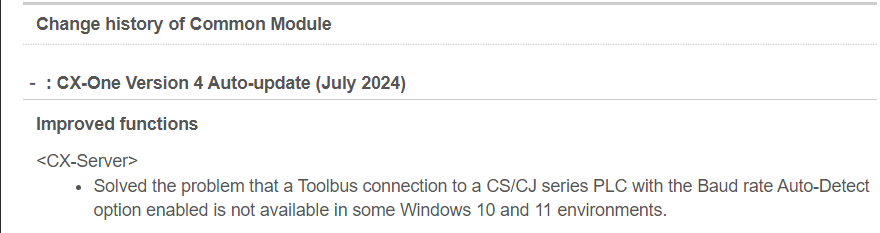
Microsoft has updated some drivers that makes connecting to equipment using the Toolbus-protocol nearly impossible.
The Solution
There are two ways to tackle this problem:
Update CX-One using the Omron Automation Software AutoUpdate tool.
The update from July 2024 fixes the issue:
In case there's no time to run the update or no Internet access:
Set Dipswitch 4 of the PLC to On and connect to it using the SYSMAC WAY Protocol.
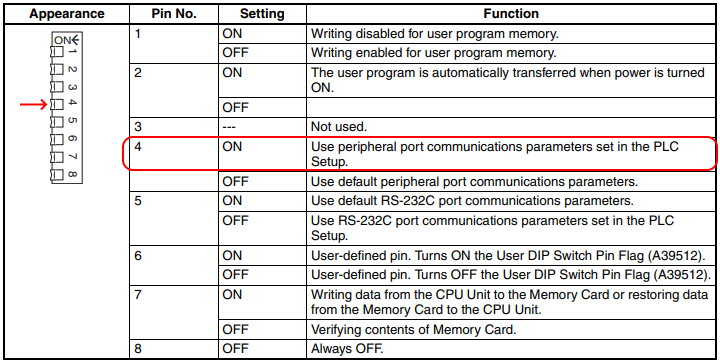
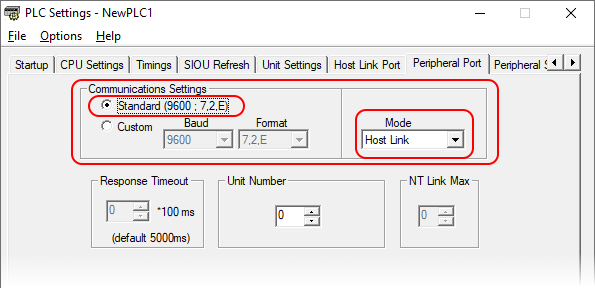
Note: This only works if the Peripheral port is not configured yet, but has its default settings.
Was this article helpful?
That’s Great!
Thank you for your feedback
Sorry! We couldn't be helpful
Thank you for your feedback
Feedback sent
We appreciate your effort and will try to fix the article