In Sysmac Studio a 16-bit port (WORD or UINT) in the I/O Map can be mapped to an ARRAY OF BOOL variable. Each array element then holds one bit, so the program can use single bits directly, e.g. InVariable[0], without masking bits out of a word. The array must have one element per bit: ARRAY[0..15] OF BOOL for a 16-bit port.
The example below uses an NX-ECC203 EtherCAT coupler with an NX-ID5442 (16 inputs) and an NX-OD5256 (16 outputs). The same method works for other EtherCAT devices, for example the status word or control word of a frequency inverter.
Procedure
Step 1: Add the I/O units. In Multiview Explorer, go to Configurations and Setup → EtherCAT, double-click the coupler node and add the units.
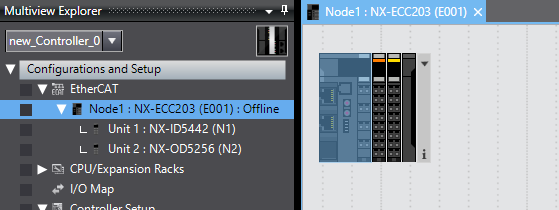
Step 2: Create the array variables first. In the Global Variables table, add one variable per port. This step is mandatory: a variable must exist before it can be assigned in the I/O Map.
Variable | Data type | Mapped to |
|---|---|---|
InVariable | ARRAY[0..15] OF BOOL | NX-ID5442, Input Bit 16 bits (WORD) |
OutVariable | ARRAY[0..15] OF BOOL | NX-OD5256, Output Bit 16 bits (WORD) |
Step 3: Map the arrays in the I/O Map. Open Configurations and Setup → I/O Map. On the WORD port Input Bit 16 bits, enter InVariable in the Variable column. Do the same with OutVariable on Output Bit 16 bits. Leave the single-bit rows (Input Bit 00–15) empty.
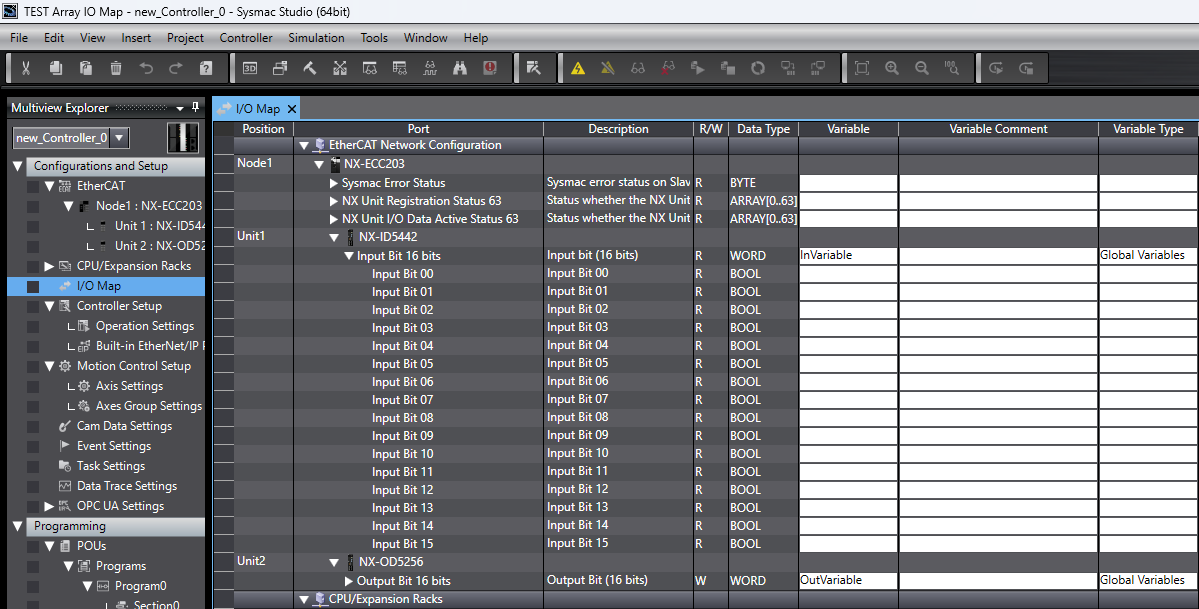
Step 4: Use the bits in the program. Each element is addressed by its bit number. In the example, input bit 0 drives output bit 0.
Using it with other EtherCAT devices
The same steps apply to any device whose PDO data appears in the I/O Map as a 16-bit port, such as a frequency inverter's status word. Map the port to an ARRAY[0..15] OF BOOL and read single status bits, e.g. DriveStatus[5], directly in the program.
See the solution M1 Ethercat Main Circuit DC Voltage detection for this.
Was this article helpful?
That’s Great!
Thank you for your feedback
Sorry! We couldn't be helpful
Thank you for your feedback
Feedback sent
We appreciate your effort and will try to fix the article