Related pages
| ? Troubleshooting EtherCAT |
Basic information about EtherCAT
Physically, the network is connected with junctions and branches, as you're used to with ordinary Ethernet. In terms of traffic, however, communication is always serial. All data to and from all nodes passes through every node. You can therefore think of the cable as a ring, where one wire pair is for the outgoing direction and the other for the return. The return pair carries information from all nodes back to the master, which is why EtherCAT communicates extremely fast between master and nodes, often using a single telegram.
Because of this principle, a break in the return pair or a loose contact on any connector or cable will often affect the whole network. So follow the manual carefully when it comes to cable type, length, shielding, grounding and routing.
If you disconnect a node, the electronics will often handle it by ignoring the node. This is not the case with a loose contact or noise, which is seen as a disturbance and a LostFrame. LostFrames cause an EtherCAT error and can make communication stop.
EtherCAT is therefore somewhat more vulnerable than, for example, EtherNet/IP, where data traffic between the nodes and the master is more individual, often with one telegram in each direction per node. That principle limits performance, speed and capacity, but makes it more robust against faults on a cable or connector.
How to add a node to EtherCAT
- Have you installed the product's ESI file in Sysmac Studio? The latest version of Sysmac Studio comes with ESI files for all relevant Omron products preinstalled. Go to step 5.
- If this is not an Omron product, you need to add the ESI file (.xml). A smart trick is to run Compare and Merge to find the revision number:
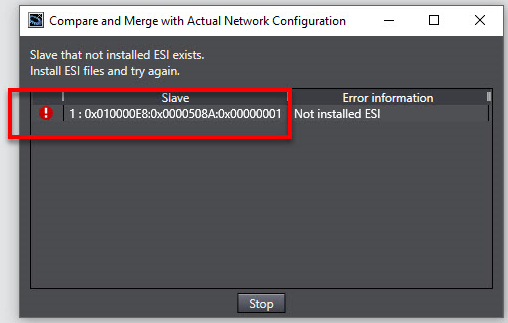
The revision number is the code after the last colon. This number MUST match the ESI file you install, otherwise you will run into trouble.
Select Display ESI Library from the right-click menu on the CPU after selecting EtherCAT, and click Install (File).
Check that the file does not have a red dot, which indicates that something is wrong. If it's OK, go to step 4. - Click + to see if you can find the error yourself. If not, contact Omron Support. If an ESI file has errors or is missing information, we may have to charge for running tests for you. We are not allowed to modify ESI files that are not ours.
- Restart Sysmac Studio.
- Drag and drop the correct product from the menu on the right onto the master or the network. Alternatively, you can scan the network with Compare and Merge with Actual Network Configuration from the master's right-click menu.
- Edit PDO if necessary.
- Transfer to the controller and test.
- If you have communication problems, see the solution about Troubleshooting EtherCAT .
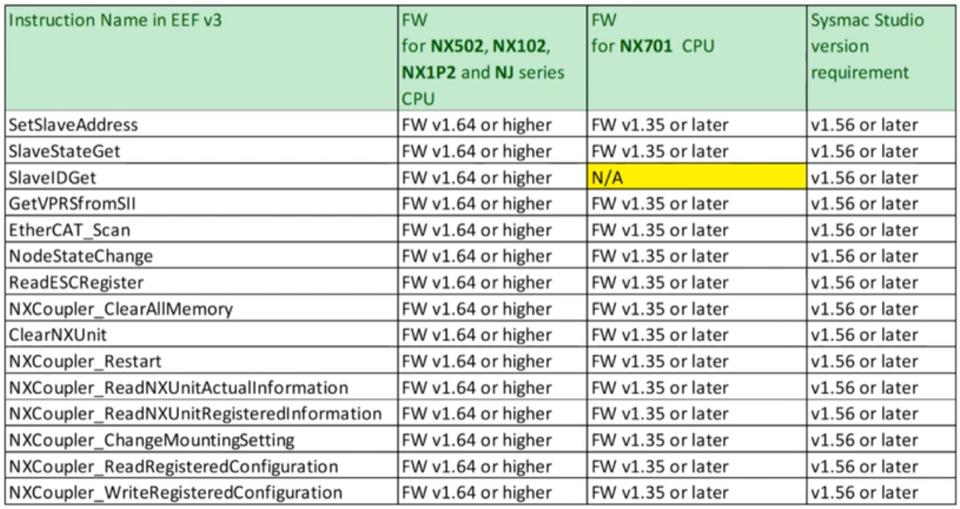
Useful function blocks for EtherCAT
You can find useful function blocks for EtherCAT in the EEF Library.
EtherCAT ring
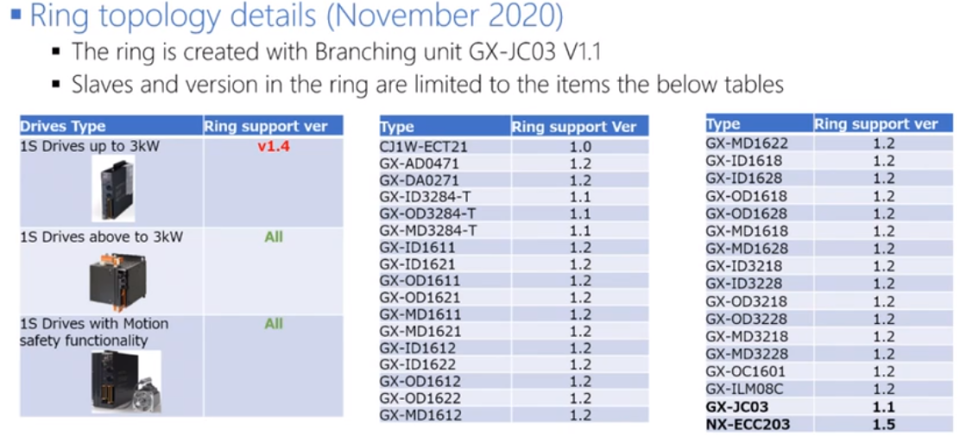 | RX2, Q2A and Q2V SI-ES3 EtherCAT can be used in an EtherCAT ring. MX2 cannot be used in a ring, "due to technical design". JC06 cannot form a ring, even though it looks like it in the documentation and on the module itself. This marking is probably meant for masters that need 2 cables to form a ring. 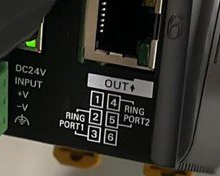 Important settings when using an EtherCAT ring
|
Predefined system variables in Sysmac Studio for EtherCAT
| Variable | Data type | Description |
|---|---|---|
_EC_ErrSta | WORD | 16 error bits for the EtherCAT master. See W505 7-9 |
_EC_PortErr | WORD | 16 error bits for the EtherCAT port. See W505 7-8 |
_EC_MstrErr | WORD | 16 error bits for master and slaves. See W505 7-8 |
_EC_SlavErr | WORD | 16 error bits for all slaves. See W505 7-8 |
_EC_SlavErrTbl | Array [1..192] OF WORD | 192 error words, indexed by the slave's node number. See W505 7-8 |
_EC_MacAdrErr | BOOL | MAC Address Error |
_EC_LanHwErr | BOOL | Communications Controller Error |
_EC_LinkOffErr | BOOL | Lost communication with all slaves |
_EC_NetCfgErr | BOOL | Network Configuration Information Error |
_EC_NetCfgCmpErr | BOOL | Network Configuration Verification Error |
_EC_NetTopologyErr | BOOL | Network Configuration Error |
_EC_PDCommErr | BOOL | Process Data (PDO) Communications Error |
_EC_PDTimeoutErr | BOOL | Process Data Reception Timeout Error |
_EC_PDSendErr | BOOL | Process Data Transmission Error |
_EC_SlavAdrDupErr | BOOL | Slave Node Address Duplicated Error |
_EC_SlavInitErr | BOOL | Slave Initialization Error |
_EC_SlavAppErr | BOOL | Slave Application Error |
_EC_MsgErr | BOOL | EtherCAT Message Error |
_EC_SlavEmergErr | BOOL | Emergency Message Detected |
_EC_IndataInvalidErr | BOOL | Input Process Data Invalid Error |
_EC_CommErrTbl | Array [1..192] OF BOOL | 192 error bits, indexed by the slave's node number. |
_EC_CycleExceeded | BOOL | EtherCAT Communications Cycle Exceeded |
_EC_RegSlavTbl | Array [1..192] OF BOOL | 192 bits, indexed by the slave's node number. The slave is registered in the master setup. |
_EC_EntrySlavTbl | Array [1..192] OF BOOL | 192 bits, indexed by the slave's node number. The slave was registered by the master at startup. |
_EC_MBXSlavTbl | Array [1..192] OF BOOL | 192 bits, indexed by the slave's node number. The slave can communicate with the master. |
_EC_PDSlavTbl | Array [1..192] OF BOOL | 192 bits, indexed by the slave's node number. The slave has PDO communication with the master. Data is valid and up to date. |
_EC_DisconnSlavTbl | Array [1..192] OF BOOL | 192 bits, indexed by the slave's node number. The slave has been disconnected with Sysmac Studio or the EC_DisconnectSlave FB and is not part of the "loop". It can be brought back with EC_ConnectSlave. |
_EC_DisableSlavTbl | Array [1..192] OF BOOL | Slave Disabled |
_EC_PDActive | BOOL | All PDO communication OK |
_EC_PktMonStop | BOOL | Packet Monitoring Stopped |
_EC_LinkStatus | BOOL | Link status OK |
_EC_PktSaving | BOOL | Saving Packet Data File. Related to the EC_SaveMon FB. |
_EC_InDataInvalid | BOOL | PDO data invalid |
_EC_RingBreaking | BOOL | The EtherCAT ring is broken at one point |
_EC_RingBreakNodeAdr | UINT | Node address of the slave just before the break in the ring. |
Was this article helpful?
That’s Great!
Thank you for your feedback
Sorry! We couldn't be helpful
Thank you for your feedback
Feedback sent
We appreciate your effort and will try to fix the article