Introduction
This tutorial is designed to cover the NS to PLC connection via a dedicated line using a Gener modem.
I. Setting modems
1. AT & F Recall factory configuration
2. AT + MS: V34 + Mod 11,0,0,19200,19200 without self-adaptation limited to 19200
3. AT% E3 Renegotiation line (bad quality) A
4. AT & D0 DTR signal strength
5. AT! RS: 19200, E, 7.2 format 19,200 bps, even parity, 7 bits, 2 stop
6. Remove ATE0Q1 echo and accounts
7. Turn switch 3 to ON on 2 modems
8. Turn switch 1 to ON on one of the modems (respondent)
II. Setting the PLC CS / CJ
1. Configure the custom port of RS232C PLC to Hostlink 19200,7,2, E
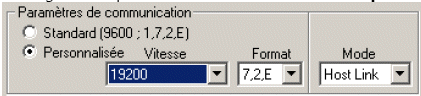
2. Switch switch 5 on the front of the PLC OFF
III. Setting the NS
1. Configure the RS2323C port using the NS to mode Host Link 19200Bps
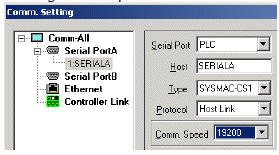
IV. Wiring PLC / NS and Modem
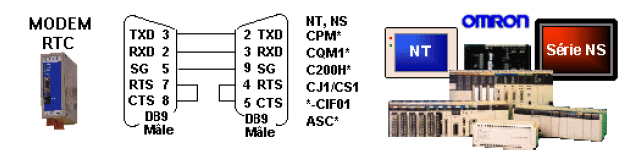
Attention!: Be careful to identify both the PLC side and the side of the modem cable
Was this article helpful?
That’s Great!
Thank you for your feedback
Sorry! We couldn't be helpful
Thank you for your feedback
Feedback sent
We appreciate your effort and will try to fix the article