Introduction
This document describes the procedure to configure and connect a CP1[] series PLC to an RX2 inverter drive for simple motion control using Modbus RTU. This example is intended for a new CP1/RX2 user and illustrates easy programming and configuration for simple inverter motion control of a new system.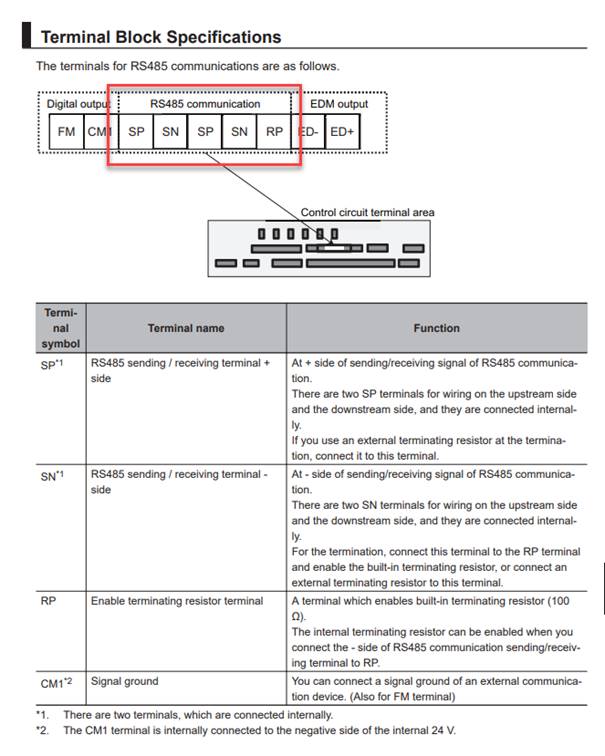
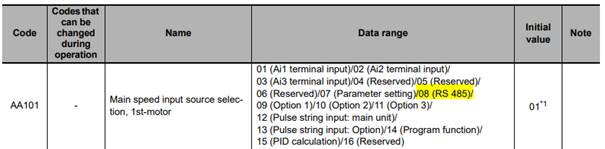
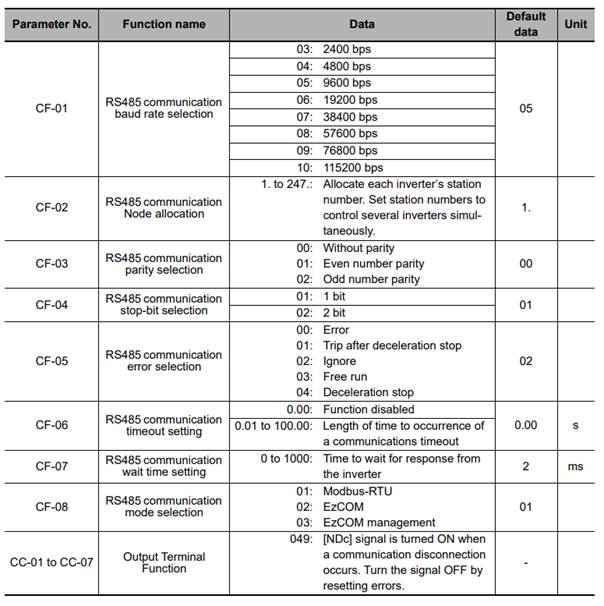
By default, the RX2 is set to accept speed reference and run command signals from the built-in front panel keypad and external digital input signals. In order for the RX2 to be controlled entirely over Modbus, the following parameters (AA101and AA111 highlighted in yellow, below) must be changed. Please be sure to cycle the power to the inverter after changing these parameters in order for the new settings to take effect. The sample CX-Programmer project uses Modbus settings of 9,600bps (baud rate), 8 data bits, 1 stop bit and no parity, and also assumes that the RX2 has a node number (network address) of 1. Therefore, no other parameters need to be changed from the defaults, as they already match these settings.

Was this article helpful?
That’s Great!
Thank you for your feedback
Sorry! We couldn't be helpful
Thank you for your feedback
Feedback sent
We appreciate your effort and will try to fix the article