Most NJ and NX controllers can be updated to newer firmware using an SD card and a simple procedure. The exceptions are marked in red.
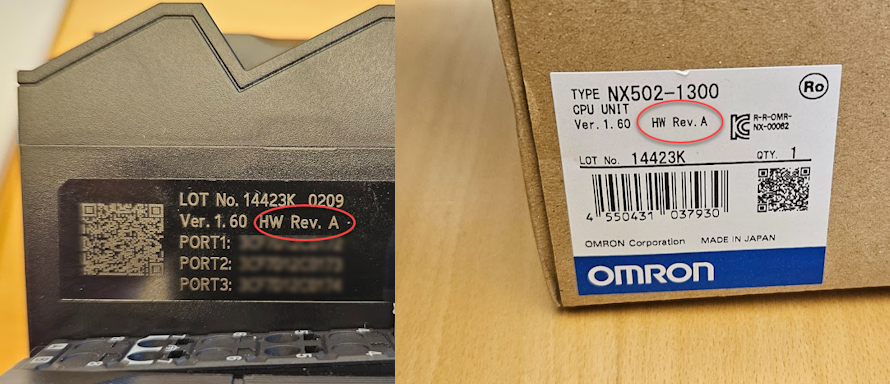
NJ1 and NJ3 can be upgraded to the latest version as long as HW version A, B, C or D is printed on the label.
NJ5 with firmware 1.18 or older can normally not be upgraded beyond 1.19.
NJ5 with firmware 1.19 can only be upgraded if HW version A, B, C, D or E is printed on the label.
Be aware that all content on the controller is erased during the update.
Example of the marking, on the controller itself and on the box:
NX1P2/NX102/NJSend an order for an SD card with the correct firmware to Omron support. Remember to state the CPU's full type designation, and the HW revision if it's an NJ. The SD card can be used on as many CPUs as you like. Updating Firmware of NJ Controller | NX502Use an Omron HMC-SDxxx card. Update files have the file extension .fwup. Update lock on newer CPUsPermission to update the controller must be enabled in Sysmac Studio: Controller Setup > Operation Settings > Basic Settings. | NA5You can update the NA5 by connecting to it with Sysmac Studio. When you transfer a project, the firmware is updated at the same time. NY5 IPChttps://www.ia.omron.com/product/tool/ipc-machine-controller/index.htm FirmwareNew firmware is usually released several times a year. You can find what has changed in manual W501 Appendix A-15. |
Was this article helpful?
That’s Great!
Thank you for your feedback
Sorry! We couldn't be helpful
Thank you for your feedback
Feedback sent
We appreciate your effort and will try to fix the article