NX I/O can be used with:
EtherCAT, with an NX-ECC coupler as remote I/O.
EtherNet/IP, with an NX-EIC coupler as remote I/O.
PROFINET, with an NX-PNC coupler as remote I/O. (NX-PNC is not supported by CJ1W-PNT21.)
NX502 CPU as local I/O.
NX102 CPU as local I/O.
NX1P2 CPU as local I/O.
NX-ECC couplers
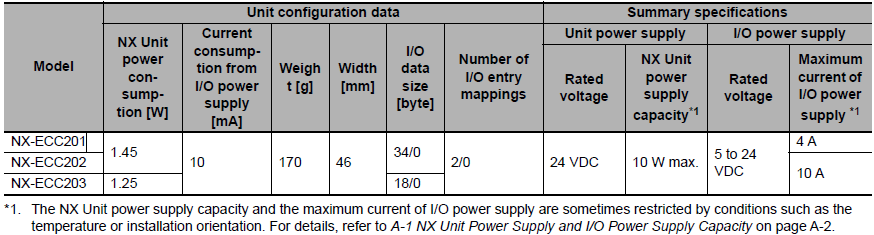
There are now 3 editions of these, or versions to be more precise. Older couplers do not necessarily support newer I/O modules. See the tables in W525 Appendix A6 for details.
Always choose the ECC203, but the 201/202 can be used if Appendix A6 confirms it. This excerpt from manual W525 shows the main differences between the 3:
NX-EIC202 CouplerA node that communicates on EtherNet/IP via TCP/UDP. The easiest way to configure I/O on the EIC202 is with NX-I/O Configurator, which comes with Sysmac Studio and CX-One. You can also use Category→Slave Terminal in Sysmac Studio, but only over USB. It does not support NX I/O with timestamp, NX-SL3500 or NX-HAD402. Also note that CIF modules on an EIC coupler can need a fair amount of extra programming, because data has to flow cyclically over EtherNet/IP in addition to the local serial communication. Omron ATC has made a library, "SerialComms", to make this easier. The EtherNet/IP Coupler Unit supports a TCP/UDP message service. You can use the TCP/UDP message service from a PLC or general-purpose PC that does not support the EtherNet/IP protocol to make settings in EtherNet/IP Slave Terminals, control I/O, and perform troubleshooting. | NX-PNC202 CouplerA PROFINET coupler developed for Siemens S7 IO controllers. It supports all NX modules except CIFxxx, ILM400, PGxxx and Safety. The fastest update rate is 64 ms. There is no support for CJ1W-PNT21 or ring networks. Data transfer is a fixed 512 bytes. The NX-PNC202 does not support legacy connection which is required for CJ1W-PNT21. TS LED |

Enable/disable NX unitsNX units mounted on an NX-ECC can be enabled or disabled with function blocks from "ATC_Ethercat Extended Functions".
W525 section 6-9-10 shows how to find the frequency with the NX-EC. Set the measurement window in ms in Module Setup, | Data hold on communication errorIf you want NX-OD and NX-DA to hold their status or a value, you can choose this with "Load Rejection Setting" on each output. Click "Edit Unit Operation Setting" after selecting the module in Sysmac Studio. |
Overview of NX modules
| NX-Unit | Type | Function | NOTE |
| CIF101/105 | Serial port, push-in | Free protocol Modbus RTU via FB | CIF101 is for RS232 CIF105 is for RS422/RS485 |
| CIF210 | 2 serial ports, D-sub | Free protocol Modbus RTU via FB | Both ports are RS232 |
| PD1000 | Terminal | Distributes more power to modules | Important to have one or more of these when you have many modules in the rack. |
| PF0730 | Terminal | Distributes more power to IOV and IOG | NX CPUs need one of these to supply voltage on IOV and IOG |
| PC00x0 | Terminal | When more IOV and IOG connections are needed | |
| TBX | Terminal | Grounding points for shielded cable | Local shield grounding for sensitive signals |
| ID3xxx | Input module | 4 digital inputs | (33xx=NPN) (34xx=PNP) |
| ID4xxx | Input module | 8 digital inputs | (43xx=NPN) (44xx=PNP) |
| ID5xxx | Input module | 16 digital inputs | (53xx=NPN) (54xx=PNP) |
| ID6xxx | Input module | 32 digital inputs | You can choose between standard wiring or a cable with connector |
| OD3xxx | Output module | 4 digital outputs | |
| OD4xxx | Output module | 8 digital outputs | |
| OD5xxx | Output module | 16 digital outputs | *See note. |
| OD6xxx | Output module | 32 digital outputs | You can choose between standard wiring or a cable with connector |
| MD6xxx | Mixed module | Both inputs and outputs | Requires a cable with connector |
| AD22xx | Analog module | 2 inputs, 4-20 mA | 2-wire with 250 ohm in parallel with the input. Double-ended. |
| AD26xx | Analog module | 2 inputs, -10 to +10 V | |
| AD32xx | Analog module | 4 inputs, 4-20 mA | 2-wire with 250 ohm in parallel with the input, or 1-wire with 250 ohm to 0 V. |
| AD36xx | Analog module | 4 inputs, -10 to +10 V | |
| AD42xx | Analog module | 8 inputs, 4-20 mA | 2-wire with 85 ohm in parallel with the input, or 1-wire with 85 ohm to 0 V. *See note. |
| AD46xx | Analog module | 8 inputs, -10 to +10 V | |
| HADxxx | Analog module | Very fast (microsecond) sampling and logging | |
| RS1201 | Analog module | Load cell input (mV) | |
| ILM400 | IO-Link | I/O module for 2-way communication | Powered via IOV and IOG. *See note. |
| TCxxxx | Controller | PID controllers with inputs and outputs | Needs NX-PF when mounted directly on a CPU |
| HB3xxx | Fault detection | Heater element monitoring | Needs a current transformer to measure current draw (E54-CTx). *See note. |
| TSxxxx | Temperature | 2/4 inputs for temperature sensors | Choose the right type for the sensor |
| V680Cx | RFID | RFID master for the V680 system | Powered via IOV and IOG. *See note. |
| ECxxxx | Counter unit | 1/2 inputs for high pulse frequencies | |
| ECSxxx | Counter unit | 1/2 inputs for SSI encoders | (RS422 line driver) |
| PGxxxx | Pulse outputs | High pulse frequency outputs | The receiver may require 5 VDC. Use resistors! |
| Sxxxx | Safety | See separate pages and documentation | *See note. |
*The NX1P2 and NX102 have no connection for NX bus I/O power (IOV, IOG). Many NX modules need I/O power to work but have no IOV/IOG connection of their own. We therefore recommend a PF0730 to provide it.
The following NX modules have no IOV/IOG of their own and MUST get them via the NX bus to work:
ID4xxx, ID5xxx, ID6342, ID6442, OD5121, OD4256, OD5256, OD6121, OD6256, AD2203, AD3203, AD4203, AD4603, DAxxxx, TCxxxx, HB3101, HB3201, ILM400, V680C, SID800, SIH400, SOD400, SOH200
As an emergency workaround (not recommended) when an NX-PF is missing, you can connect 24 VDC to the IOV and IOG outputs if there are any. But remember that these can only be loaded with 0.1 A and are connected directly to the common IOV/IOG on the bus. There is a risk of overload and a damaged module if several modules draw power from the same supply.
With NX-AUX02 you can physically key the terminal blocks so they can't be put back in the wrong place.
Summary
- All NX units need NX Unit Power. Some NX units also need NX I/O Power. This usually applies when the connected device is supplied with 24 V from the NX unit.
- The NX-ECC and NX-EIC nodes have connections and bus outputs for both Unit Power and I/O Power. The NX1P2 and NX102 CPUs only have an output for Unit Power.
- PF0630 - NX I/O power boost, 4 A. Use it if there is too little power available to the left of the NX unit. (Typical for NX1, since it provides no I/O Power output. See the table below.)
- PF0730 - NX I/O power boost, 10 A. Use it if there is too little power available to the left of the NX unit. (Typical for NX1, since it provides no I/O Power output. See the table below.)
- PD1000 - NX Unit power boost. Use it if you have so many NX units in the rack that all available power is used up.
- PC0010 - 16 extra IOG terminals. Useful for units with 16 inputs.
PC0020 - 16 extra IOV terminals. Useful for units with 16 inputs.
PC0030 - a combination of PC0010 and PC0020, with 8 extra terminals of each type. - PF and PD must be powered from an external power supply.
The table below shows modules where an additional NX-PF is recommended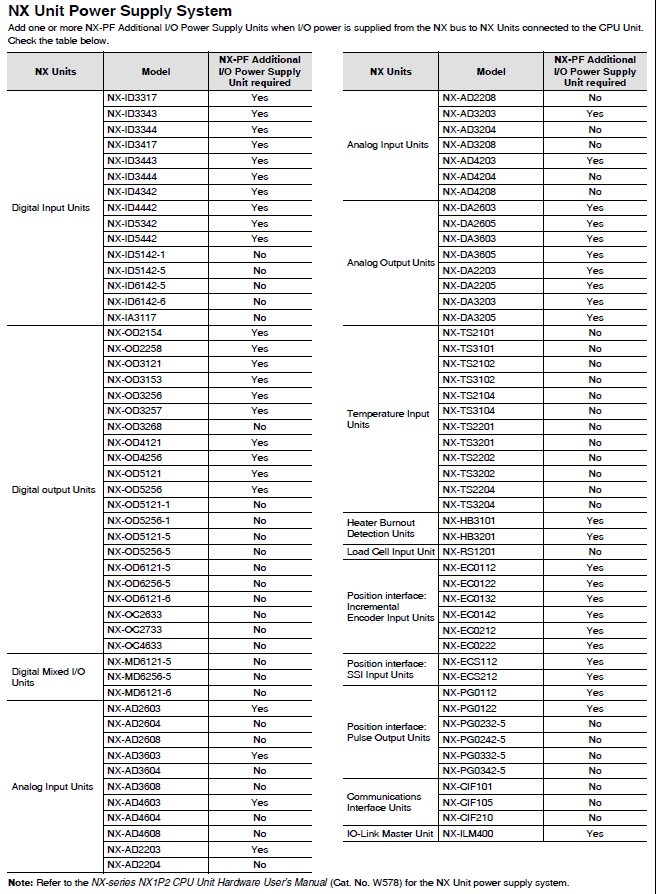
Extra terminal blocksAll NX modules come with removable terminal blocks. If you need extra ones as spare parts, you'll find the type designations for the different blocks in manual W525 Appendix A-4-3. | Module labelling |

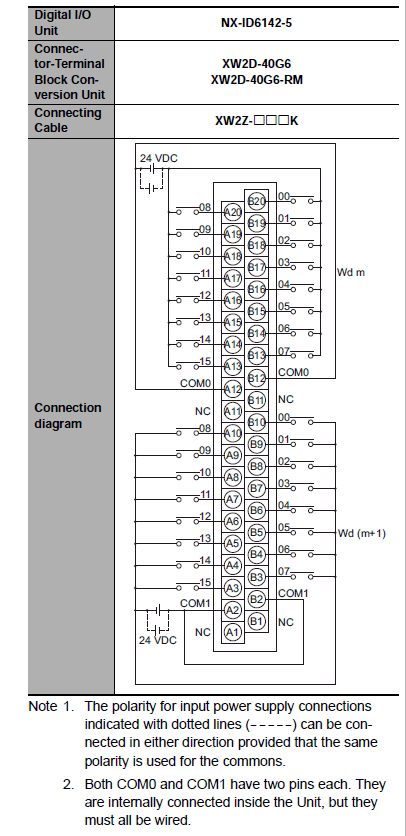
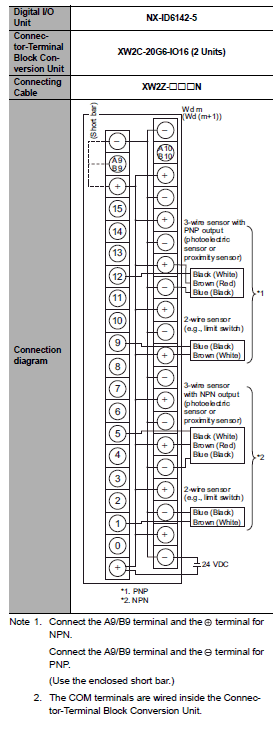
Overview of some relay solutions for NX I/O
  |
|
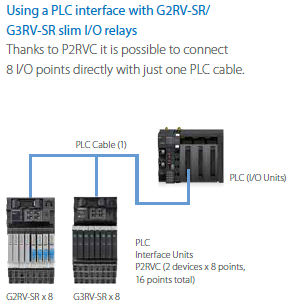
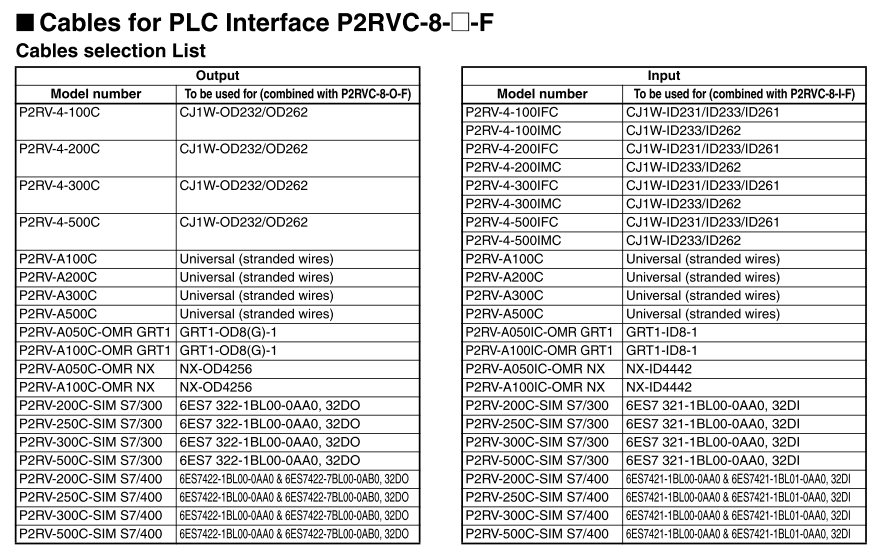
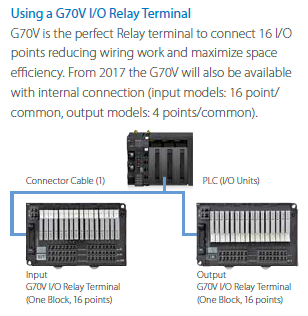
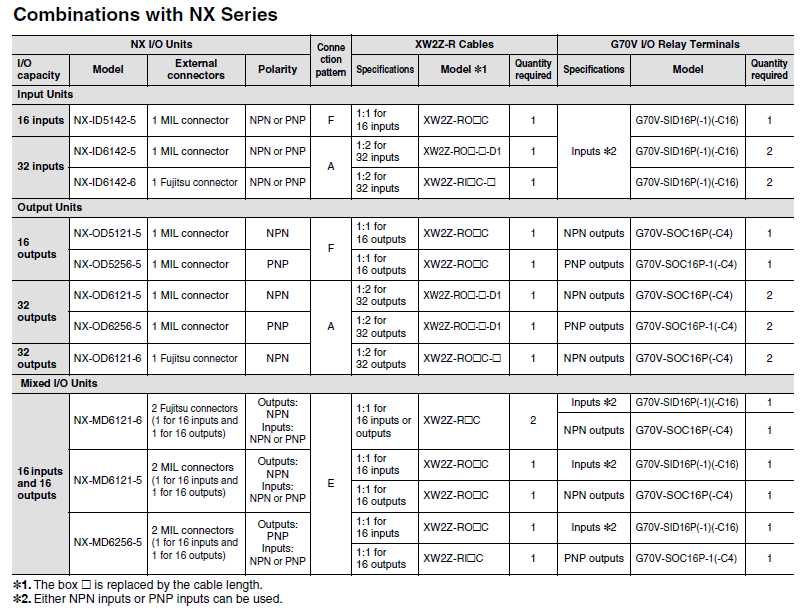
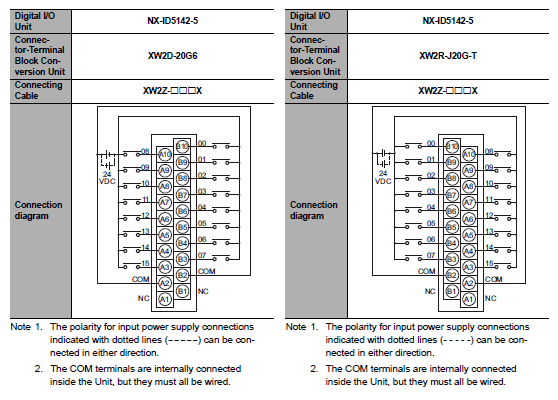
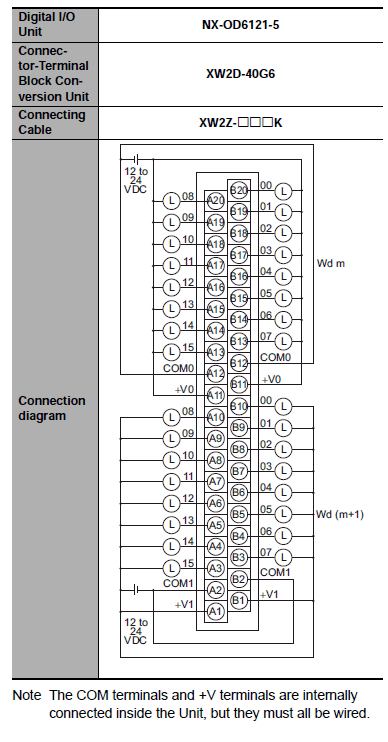
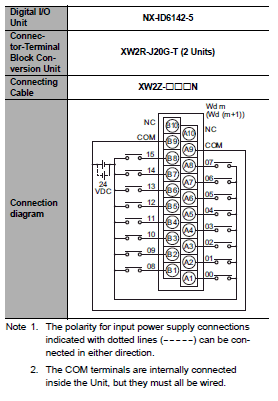
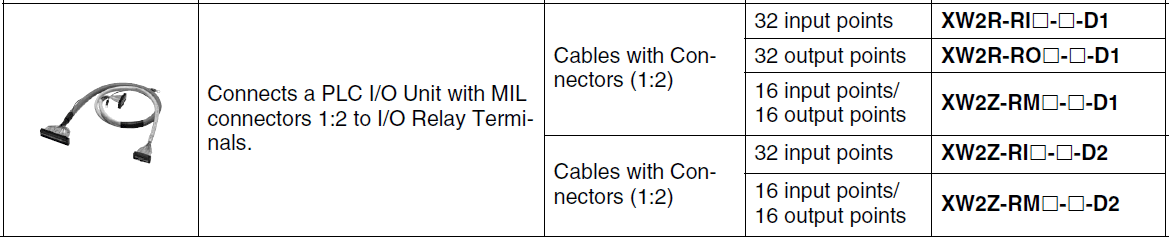
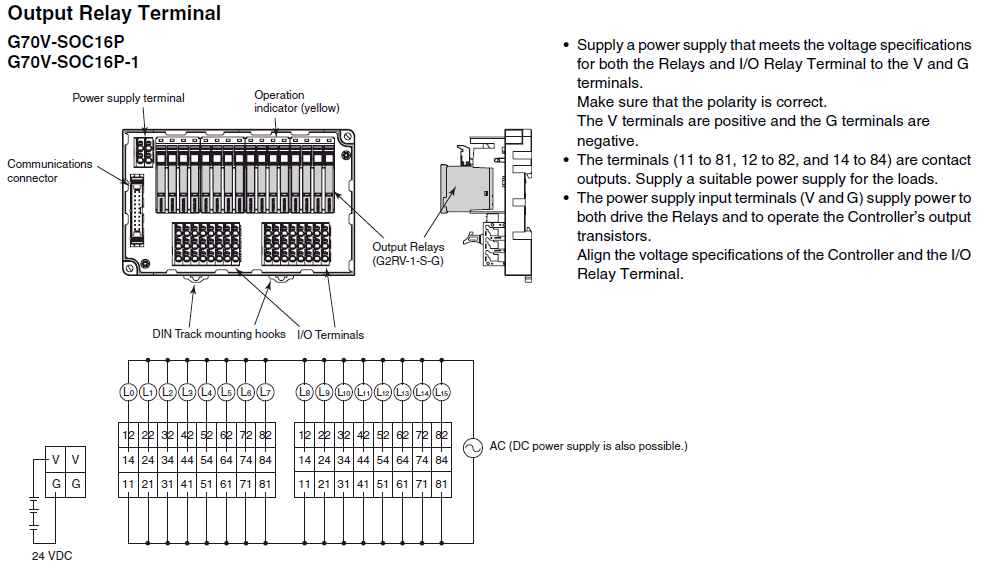
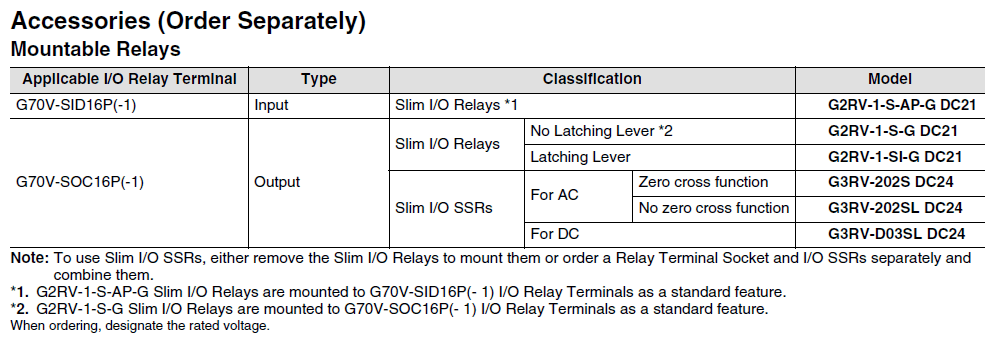
NX-OD5256-5 and XW2Z-RO__C and G70V-SOC16P-1
| |
|

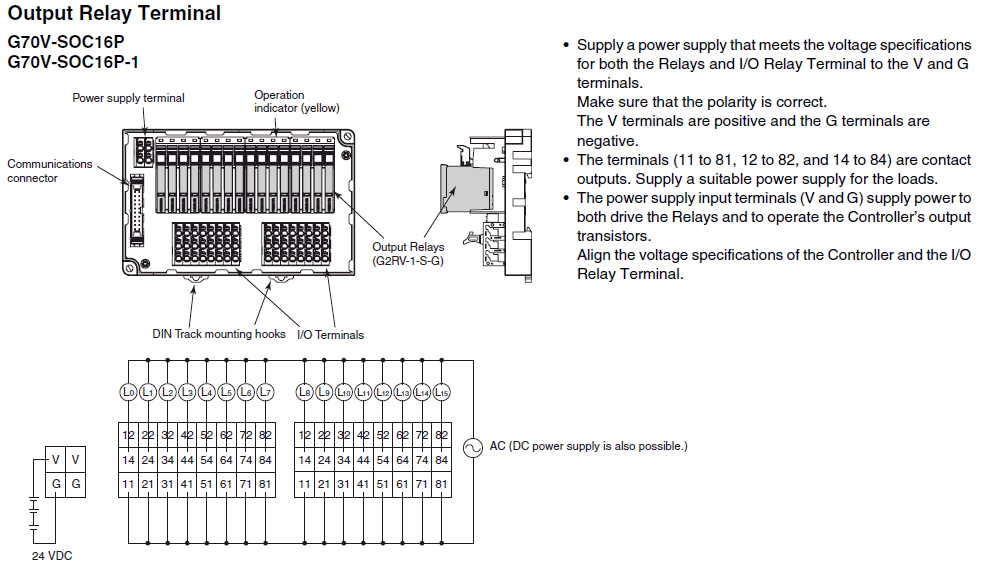
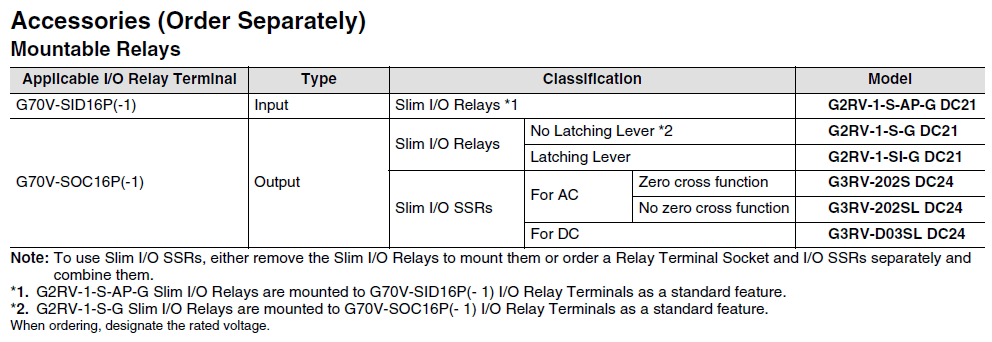
NX-OD6256-5 and XW2Z-RO__-D1 and G70V-SOC16P-1
|
|
|
NX-OD6256-5 and P2RV-4-__C and P2RVC-8-O-F |
| |
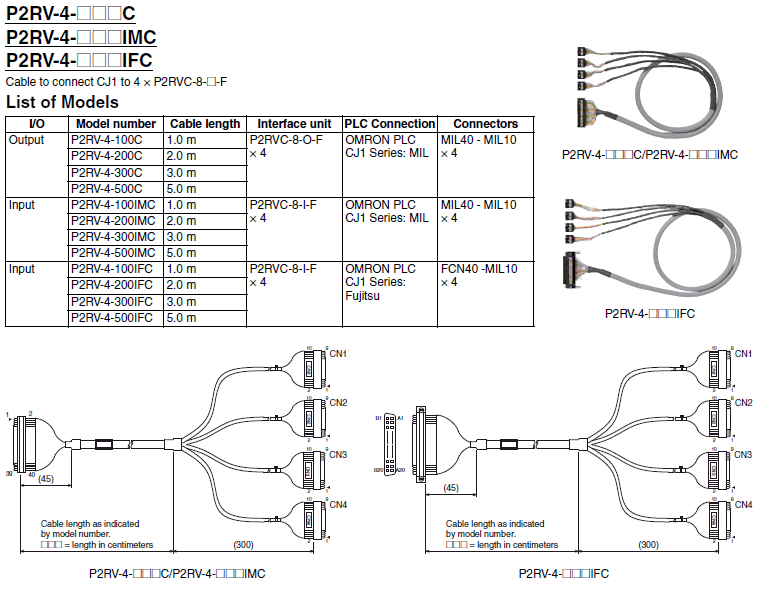
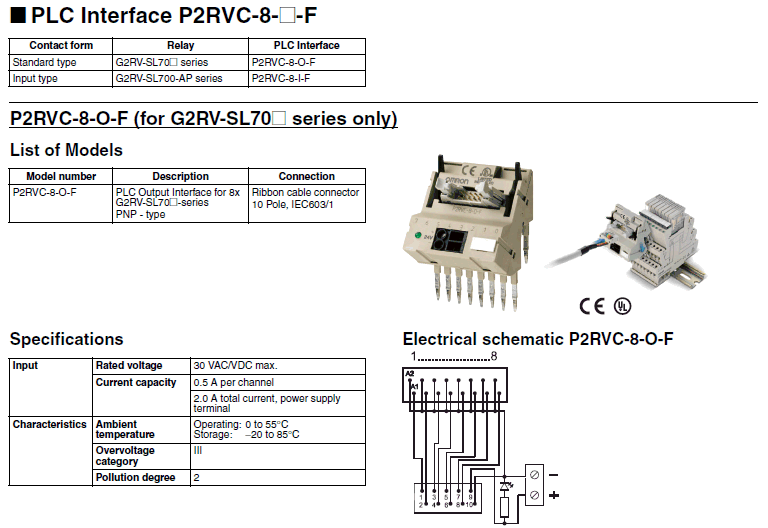
NX-OD4256 and P2RV-A100C-OMR NX and P2RVC-8-O-F
| |
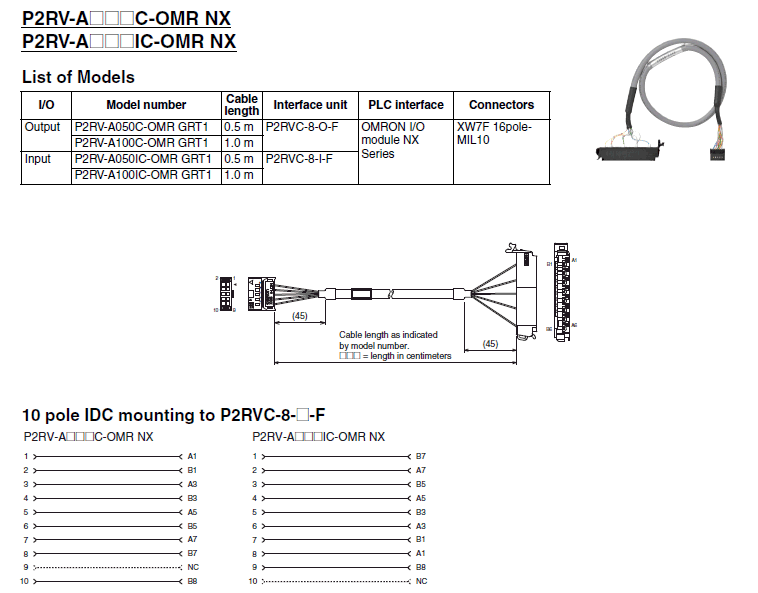
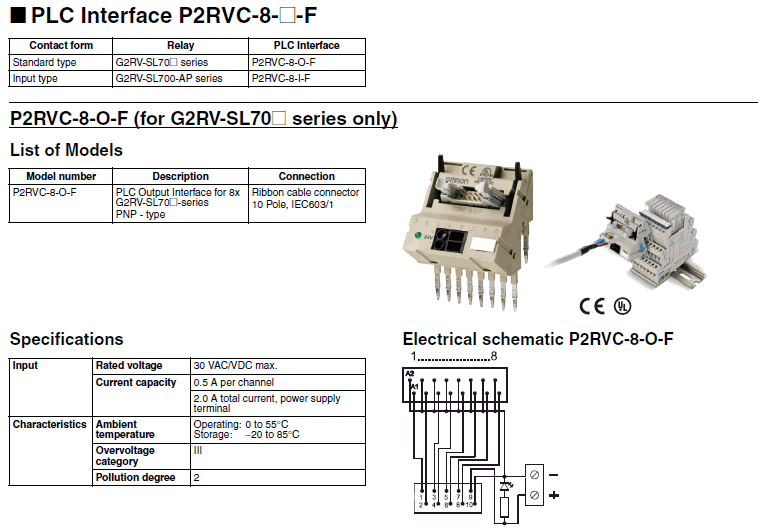
A selection of terminal solutions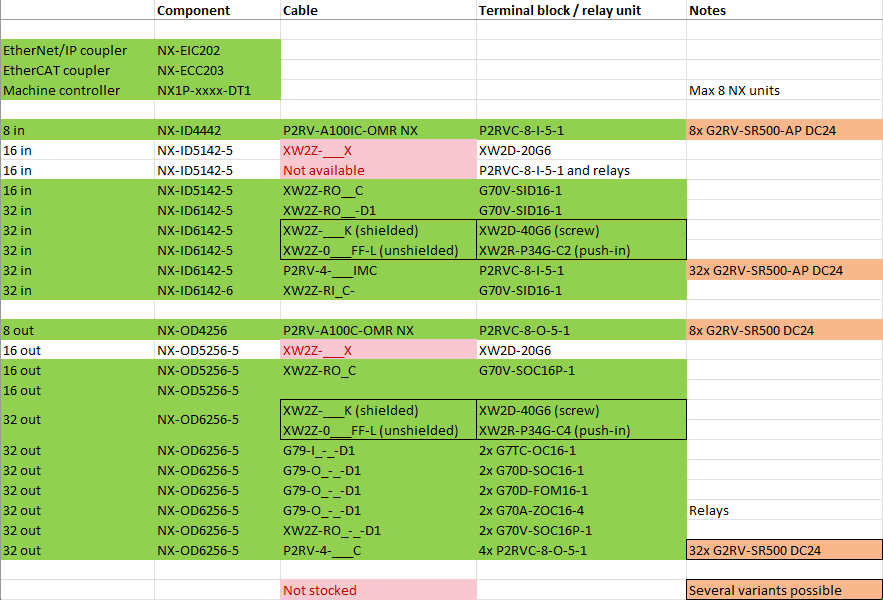
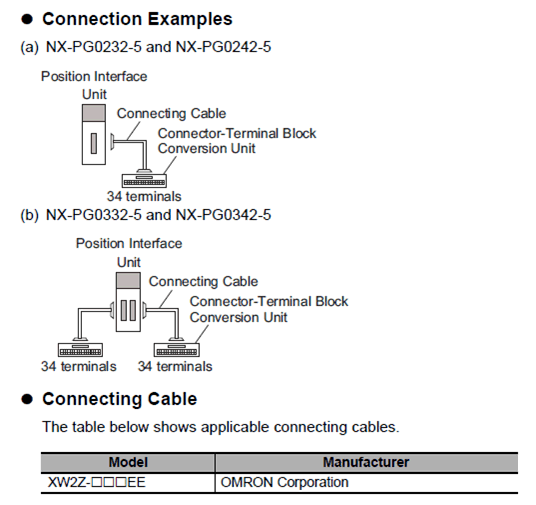
NX-PG0232 and NX-PG0242 Connection
| |
Was this article helpful?
That’s Great!
Thank you for your feedback
Sorry! We couldn't be helpful
Thank you for your feedback
Feedback sent
We appreciate your effort and will try to fix the article