Introduction
This is a quick start tutorial on how to get the data exchange between NX-Safety and Standard NX-I/Os (Analog, Digital and Temperature units) with a NX-EIC202 (Ethernet/IP Coupler) using Sysmac Studio.
Hardware Configuration
For this tutorial an example is given using the following hardware configuration:
| Hardware |
| NX-EIC202 |
| NX-SL3300 |
| NX-SIH400 |
| NX-SID800 |
| NX-SOD400 |
| NX-SOH200 |
| NX-ID3443 |
| NX-OD3256 |
| NX-AD2203 |
| NX-DA2605 |
How to configure the data exchange between NX-Safety and Standard NX-IO
This paragraph describes step-by-step how to use Sysmac Studio in order to configure NX-Safety I/O and Standard NX-I/O using NX-EIC202.
Step 1: Start a new Sysmac Studio project.
Step 2: Select "Slave Terminal" in the Category selection and "EtherNet/IP Coupler" as Device.
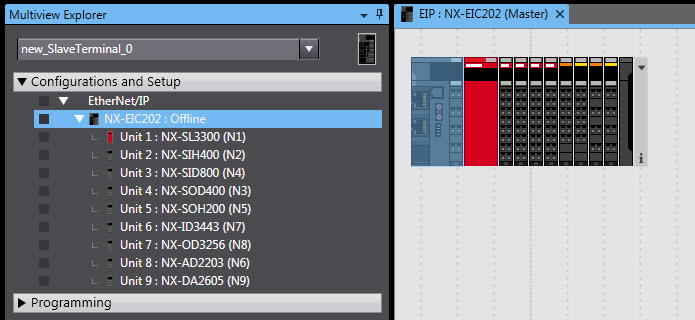
Step 3: Add several different NX I/O, Safety IN / OUT, Analog IN / OUT and Digital IN / OUT as shown in the image below.
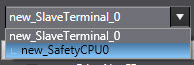
Step 2: Go to the Safety section in Sysmac Studio.
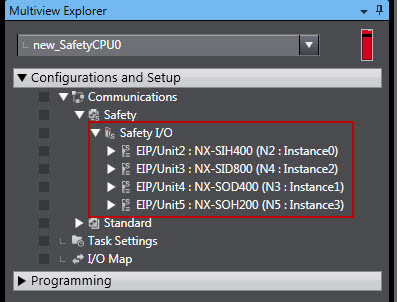
Step 3: In the safety section you have direct access to all NX-Safety Modules.
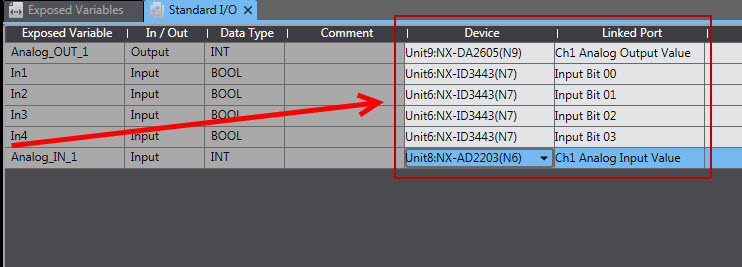
Step 4: To get access to all other standard NX I/O's you must first create the variables to be used in the Safety program. You can create the variables in the Exposed Variables tab.
.jpg)
Step 5: Connect the variables to the NX I/O devices by open the Standard I/O section and choose the connected NX Device and which Linked Port It should use.
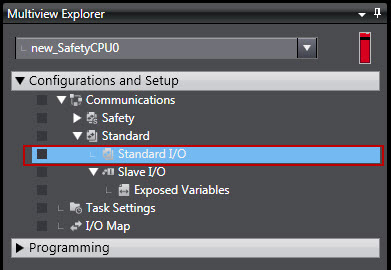
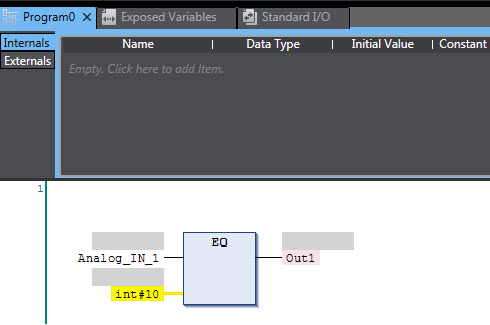
Step 6: Now you can create your safety project with standard NX I/O devices as shown below.
Specifications for I/O Data Allocations in Slave Terminals
The following limitations apply to I/O data allocations for the entire Slave Terminal:
| Item | Input data | Output data |
| Number of I/O entry mappings | 255 | 255 |
| EtherNet/IP maximum I/O connection size | 504 bytes | 504 bytes |
| Allocatable I/O data points | Maximum of 4,000 points total for both inputs and outputs | |
Software
The content of this article is based on Sysmac Studio version 1.11.
Related Manuals
| Manual name | Cat. No. |
| NX-series EtherNet/IP Coupler Unit User’s Manual | W536 |
| NX-series Digital I/O Units User’s Manual | W521 |
| NX-series Analog I/O Units User’s Manual | W522 |
| NX-series Safety Control Unit User’s Manual | Z930 |
Related Article(s)
Please read the following article How To Configure EtherNet/IP Coupler Unit for detailed information about using Tag Data Links with NX-EIC202 and CJ-series EtherNet/IP Unit or built-in EtherNet/IP port.
Was this article helpful?
That’s Great!
Thank you for your feedback
Sorry! We couldn't be helpful
Thank you for your feedback
Feedback sent
We appreciate your effort and will try to fix the article