No need to calculate CRC-16 check sum, just enter the relevant command parameters in a pre-defined Data area, and activate a start-bit.
In this example we use:
CP1H-XA40DR-A with CP1W-CIF01 RS232-Option board
CJ1W-CIF11 RS232-C/RS485 converter
(Alternatively use only CP1W-CIF11, RS485 Option board)
E5CN-Q2MT-500 Tempcontroller
Switch settings:
CIF11: 4 & 5 OFF, all the rest ON.
Wiring:
CIF11 <--------------------------> E5CN
Plint 3=SDA- connected to terminal 12=A-
Plint 4=SDB+ connected to terminal 11=B+
Temp controller settings:
Select Modbus communication Mode, Unit 1, Baud rate 9600, Send Wait 20ms
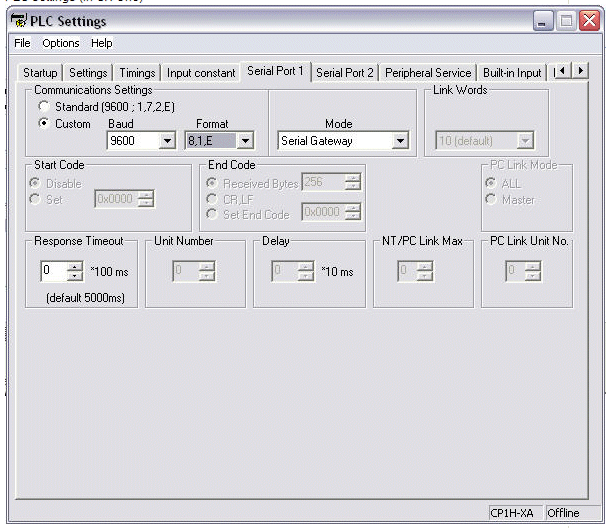
PLC settings (in CX-One)
Set the following values in D-area
D32200 = 0001 (unit number 1)
D32201 = 0003 (Function code "Read Variable)
D32202 = 0004 (Number of bytes in command string)
D32203 = 0000 (Variable start adress for Present Value)
D32204 = 0002 (Number of elements to Read, Minimum 2)
Set the send bit A640.00 to On
Response can be read in D32250 and onwards
Related Manuals:
H135-E1-01B or later, E5CN/AN/EN Communications manual
W450-E1-02 or later, CP1H Operation manual
Was this article helpful?
That’s Great!
Thank you for your feedback
Sorry! We couldn't be helpful
Thank you for your feedback
Feedback sent
We appreciate your effort and will try to fix the article