Introduction
An often asked question on the NJ5/Sysmac studio is:
Is it possible to save production data, like information stored on some variables in Controller when you download a new program?
It could be information like produced quantity, batch status, recipe information, etc.
There are implementations of machine controllers when you download a new or modified program, all data in the Controller will be deleted !!! This is a very big problem when e.g. the machine is in a commissioning phase, where there is a lot of small modifications of the program, which you have to download, in these phase the customers don't want to start from scratch every time this is happen.
In the Sysmac NJ5 and Sysmac Studio this is a very simple step to avoid this behaviour, see below:
Step 1: The variables have to be set to be "Retain"

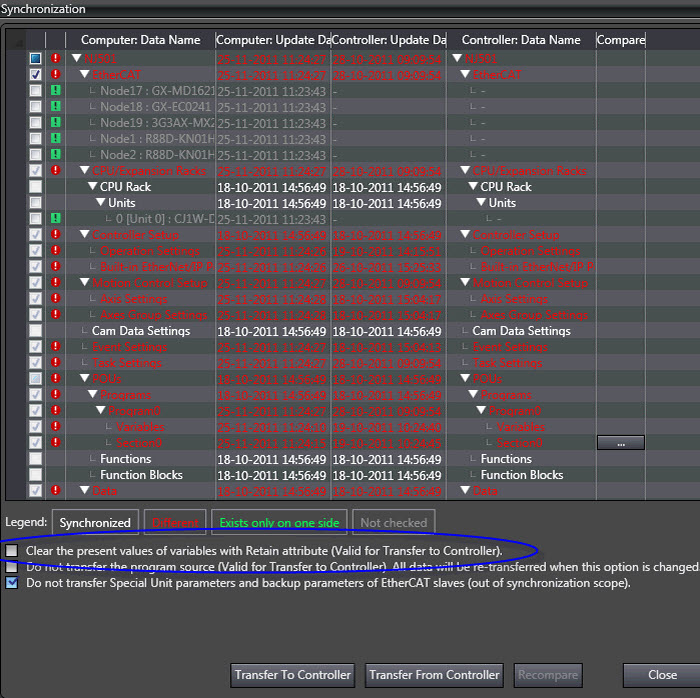
Step 2: Synchronization:
The Default setting is that variables which are marked retained, will not be deleted when a new program is downloaded to the Controller
If the customer wants the retained values to be deleted, he can select this in the Synchronization view in the Sysmac Studio, see below (the blue marking)
Was this article helpful?
That’s Great!
Thank you for your feedback
Sorry! We couldn't be helpful
Thank you for your feedback
Feedback sent
We appreciate your effort and will try to fix the article