Introduction
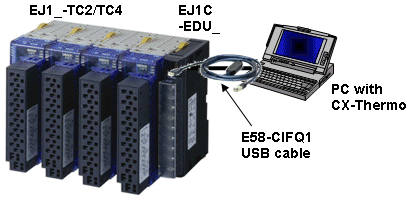
This tutorial is intended as an overivew of connecting CelciuXº to the PC and configure via CX-Thermo.
| Components used: • EJ1N-TC__-__ • EJ1C-EDU_-NFLK • 24 Volt Supply • E58-CIFQ1 • EST2-2C-MV3 or above |
 |
Procedure:
- Connect E58-CIFQ1 to the USB port of the PC. If necessary install the software driver for the USB interface unit.
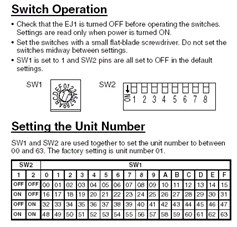
- Assemble the CelciuXº multi-loop temperature controller. Set unique unit numbers for each of the modules by adjusting the rotary switch and if necessary the dip switches.
- Connect the mini-connector from the E58-CIFQ1 to the EJ1C-EDU_-NFLK.
- Power up the CelciuXº controller
- Run CX-Thermo
- From Communications / Setting menu set the port settings for the USB device to 38400, 7, E, 2. Set the unit number of the TC modules.
- Press the on-line button and connect the relevant TC module.
- You can now upload / download / modify the configuration of the individual unit.
Was this article helpful?
That’s Great!
Thank you for your feedback
Sorry! We couldn't be helpful
Thank you for your feedback
Feedback sent
We appreciate your effort and will try to fix the article