Using Protocol Macro Communications With E5CN

Modified on Sun, 11 May, 2025 at 10:37 PM

Introduction
To use Protocol Macro instructions with E5CN-U Communications Protocol use the system protocol Compoway/F Master that is supplied with CX-Protocol and download it to the PLC.

PLC ladder can then be written to send protocol commands e.g.:
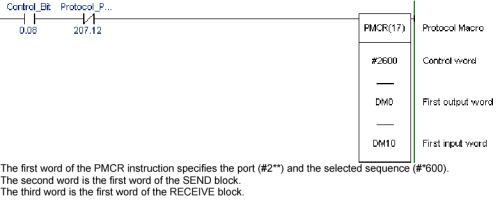


1. Communications Enable/Disable
DM0000 = 0005    No. of SEND words
DM0001 = 0001    NODE Number
DM0002 = 3005    MRC-SRC
DM0003 = 0004    No. of BYTES being sent
DM0004 = 0001(Enable)    0000(Disable)
 
2. Run/Stop
DM0000 = 0005    No. of SEND words
DM0001 = 0001    NODE Number
DM0002 = 3005    MRC-SRC
DM0003 = 0004    No. of BYTES being sent
DM0004 = 0100(Run)    0101(stop)
 
3. Read Status
DM0000 = 0007    No. of SEND words
DM0001 = 0001    NODE Number
DM0002 = 0101    MRC-SRC
DM0003 = 0012    No. of BYTES being sent
DM0004 = C000   VARIABLE TYPE +1/2 ADDRESS
DM0005 = 0100    1/1 ADDRESS + 00
DM0006 = 0001    No. of ELEMENTS
Response
DM0010 = 0004    No. of RECEIVED words
DM0011 = 0000    RESPONSE CODE
DM0012 = ****    First 16 Bits
DM0013 = ****    Second 16 Bits
 
4. Read Process Value
DM0000 = 0007    No. of SEND words
DM0001 = 0001    NODE Number
DM0002 = 0101    MRC-SRC
DM0003 = 0012    No. of BYTES being sent
DM0004 = C000   VARIABLE TYPE +1/2 ADDRESS
DM0005 = 0000    1/2 ADDRESS + 00
DM0006 = 0001    No. of ELEMENTS
Response
DM0010 = 0004    No. of RECEIVED words
DM0011 = 0000    RESPONSE CODE
DM0012 = ****    Lower 4 digits in HEX
DM0013 = ****    Upper 4 digits in HEX
 
5. Change Set Value
DM0000 = 0009    No. of SEND words
DM0001 = 0001    NODE Number
DM0002 = 0102    MRC-SRC
DM0003 = 0020    No. of BYTES being sent
DM0004 = C100   VARIABLE TYPE +1/2 ADDRESS
DM0005 = 0300    1/2 ADDRESS + 00
DM0006 = 0001    No. of ELEMENTS
DM0007 = 0000(HEX)    Upper 4 digits of SV
DM0008 = 00FF(HEX)    Lower 4 digits of SV (eg 255)
Response
DM0010 = 0004    No. of RECEIVED words
DM0011 = 0000    RESPONSE CODE
DM0012 = ****    First 16 Bits
DM0013 = **** Second 16 Bits


Bit Position Status Bit Description Bit Description
    0 1
0 Heater overcurrent (CT1) Not generated  Generated
1 Heater current hold (CT1) See Note1) Update  Hold
2 HB (heater burnout) error Not generated  Generated
3 HS alarm output (CT1) OFF  ON
4 Spare OFF  ---
5 Display range exceeded Not generated  Generated
6 Input error Not generated  Generated
7 Spare OFF  ---
8 Control output (heating) OFF  ON
9 Control output (cooling) OFF  ON
10 HB (heater burnout) alarm output (CT1) OFF  ON
11 HB (heater burnout) alarm output (CT2) OFF  ON
12 Alarm output 1 OFF  ON
13 Alarm output 2 OFF  ON
14 Alarm output 3 OFF  ON
15 Program end output OFF  ON
16 Event input 1 OFF  ON
17 Event input 2 OFF  ON
18 Spare OFF  ---
19 Spare OFF  ---
20 Write mode Backup mode  RAM write mode
21 EEPROM RAM=EEPROM  RAM=EEPROM
22 Setup area Setup area 0  Setup area 1
23 AT execute/cancel AT cancelled  AT execution in progress
24 RUN/STOP Run  Stop
25 Communications writing OFF (disabled)  ON enabled
26 Auto/manual switch Automatic mode  Manual mode
27 Spare OFF  ---
28 Heater overcurrent (CT2) Not generated  Generated
29 Heater current hold (CT2)(See note 1) Update  Hold
30 Spare OFF  ---
31 HS alarm output (CT2) OFF  ON

Note 1 - When the control output ON time is less than 190 ms, the bit is set to '1' and the heater current is held at the last current value.
Note 2 - 'Spare' bits are always OFF.
Note 3 - When read in setup area 1, the status of the bits will always be as follows:
Overcurrent: Last value held
HB error: Last value held
Input error: Last value held
HB and HS outputs: Cleared
Program end output: Cleared
Current hold: Last value held
Display range exceeded: Last value held
Heating and cooling outputs: Cleared
Alarm outputs: Cleared
 

Was this article helpful?

That’s Great!

Thank you for your feedback

Sorry! We couldn't be helpful

Thank you for your feedback

Let us know how can we improve this article!

Select at least one of the reasons
CAPTCHA verification is required.

Feedback sent

We appreciate your effort and will try to fix the article