Yes, by enabling the transfer of Date and Time in NS Syetem settings, it is possible to transfer current time to any data area in the PLC.
First, select the data area (in this example Serial:D00000)
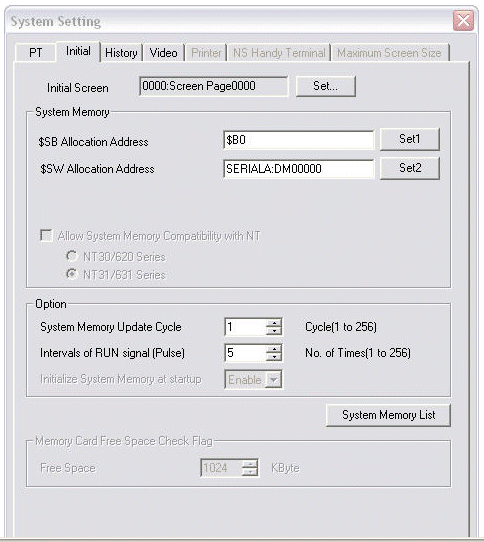
First, select the data area (in this example Serial:D00000)
Then, click the button "System Memory List".
Click on the "Next"-button until you see the following:
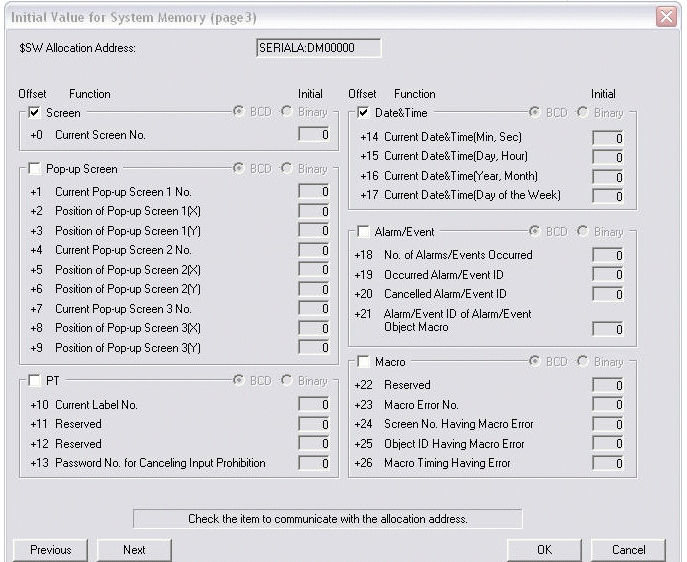
Transfer the settings to the NS HMI. While communicating with the host PLC, the NS Date and Time will appear in PLC memory areas DM0014 to DMProduct Type based on the above settings.
Was this article helpful?
That’s Great!
Thank you for your feedback
Sorry! We couldn't be helpful
Thank you for your feedback
Feedback sent
We appreciate your effort and will try to fix the article