The FB Modbus TCP Client provides some read/write features in accordance with the specifications defined by the Modbus organization.
List of read/write functions provided :
Code | Modbus Function | Function Block |
0x01 | Read Coils | MTCP_Client_Fn01 |
0x02 | Read Discret Inputs | MTCP_Client_Fn02 |
0x03 | Read Holding Registers | MTCP_Client_Fn03 |
0x04 | Read Input Registers | MTCP_Client_Fn04 |
0x05 | Write Single Coil | MTCP_Client_Fn05 |
0x06 | Write Single Register | MTCP_Client_Fn06 |
0x10 | Write Multiple Registers | MTCP_Client_Fn10 |
0x17 | Read Write Multiple Registers | MTCP_Client_Fn17 |
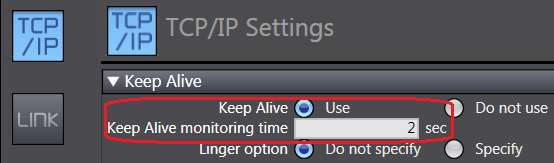
The option Keep-Alive should be fixed to a short time to enable quick re-connection when server was disconnected roughly.
MTCP_Client_Connect
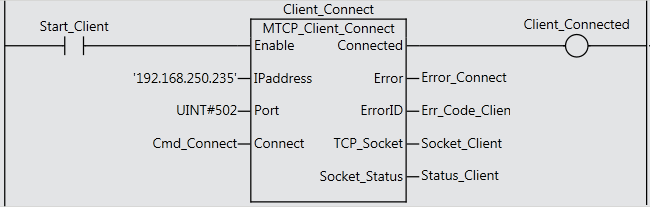
Input variables
Name | type | range | Description |
Enable | Bool | OFF, ON | FB Activation |
IPaddress | STRING | n.n.n.n | IP Address of the server |
Port | UINT | 0-65535 | Remote port n° on server (502 by default |
Connect | Bool | OFF, ON | Request to connect to the server |
Output variables
Name | type | Range | Description |
Connected | Bool | OFF, ON | ON : Connected to the server |
Error | Bool | OFF, ON | Error flag |
ErrorID | UINT | 0 - 65535 | Error Code returned by the socket or Modbus TCP server (see error code list below). |
TCP_Socket | _sSocket | Structure | DstAdr, Handle and SrcAdr |
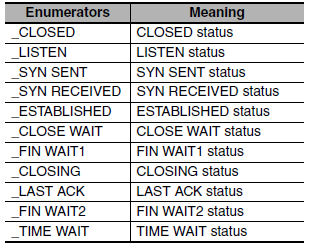
Socket_Status | _eCONNECTION_STATE |
|
|
Input variables of MTCP_Client_Fnxx
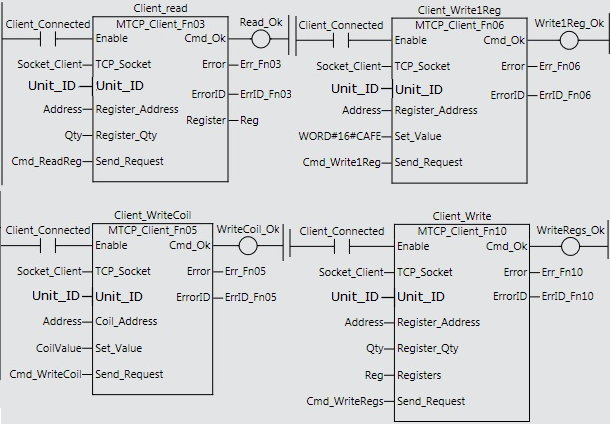
MTCP_Client_Fn01 | type | range | Description |
Enable | Bool | OFF, ON | FB Activation (use Connected output of FB connect) |
TCP_Socket | _sSocket | structure | Handle of the socket used (given by the FB Connect) |
Unit_ID | BYTE | 00-FF | Unit Identifier (255 by default) |
Coil_Address | WORD | 0 - FFFF | Address of 1rst coil/discret input |
Coil_Qty | UINT | 0 - 00FF | Number of coils/discret inputs |
Send_Request | Bool | OFF, ON | Read Command |
MTCP_Client_Fn03 | type | range | Description |
Enable | Bool | OFF, ON | FB Activation (use Connected output of FB connect) |
TCP_Socket | _sSocket | structure | Handle of the socket used (given by the FB Connect) |
Unit_ID | BYTE | 00-FF | Unit Identifier (255 by default) |
Register_Address | WORD | 0 - FFFF | Address of 1rst register |
Register_Qty | UINT | 0 - 00FF | Number of registers |
Send_Request | Bool | OFF, ON | Read Command |
MTCP_Client_Fn05 | type | range | Description |
Enable | Bool | OFF, ON | FB Activation (use Connected output of FB connect) |
TCP_Socket | _sSocket | structure | Handle of the socket used (given by the FB Connect) |
Unit_ID | BYTE | 00-FF | Unit Identifier (255 by default) |
Coil_Address | WORD | 0 - FFFF | Address of the coil |
Set_Value | Bool | OFF, ON | ON/OFF value to be written |
Send_Request | Bool | OFF, ON | Write command |
MTCP_Client_Fn06 | type | range | Description |
Enable | Bool | OFF, ON | FB Activation (use Connected output of FB connect) |
TCP_Socket | _sSocket | structure | Handle of the socket used (given by the FB Connect) |
Unit_ID | BYTE | 00-FF | Unit Identifier (255 by default) |
Register_Address | WORD | 0 - FFFF | Address of the register |
Set_Value | WORD | 0 - FFFF | Value to write |
Send_Request | Bool | OFF, ON | Write command |
MTCP_Client_Fn10 | type | range | Description |
Enable | Bool | OFF, ON | FB Activation (use Connected output of FB connect) |
TCP_Socket | _sSocket | structure | Handle of the socket used (given by the FB Connect) |
Unit_ID | BYTE | 00-FF | Unit Identifier (255 by default) |
Register_Address | WORD | 0 - FFFF | Address of 1rst register |
Register_Qty | UINT | 0 - 00FF | Number of registers |
Registers | ARRAY | 0 - FFFF | Source of data (Array of 128 WORD) |
Send_Request | BOOL | OFF, ON | Write command |
MTCP_Client_Fn17 | type | range | Description |
Enable | Bool | OFF, ON | FB Activation (use Connected output of FB connect) |
TCP_Socket | _sSocket | structure | Handle of the socket used (given by the FB Connect) |
Unit_ID | BYTE | 00-FF | Unit Identifier (255 by default) |
Reg_Addr_Read | WORD | 0 - FFFF | Address of the 1st register to read |
Reg_Qty_Read | UINT | 0 - 00FF | Numbre of register to read |
Reg_Addr_Write | WORD | 0 - FFFF | Address of 1st register to write |
Reg_Qty_Write | UINT | 0 - 00FF | Number of registers to write |
Registers | ARRAY | 0 - FFFF | Source of data (Array of 128 WORD) |
Send_Request | BOOL | OFF, ON | Read-Write command |
Output variables of MTCP_Client_Fnxx
Name | type | Range | Description |
Cmd_Ok | Bool | OFF, ON | ON : Command executed |
Error | Bool | OFF, ON | Execution error flag |
ErrorID | WORD | 0 - FFFF | Error Code returned by the socket or Modbus TCP server (see error code list below). |
Register (Fn03, Fn04 & Fn17 only) | ARRAY |
| Read values are returned in an array of 128 WORD |
Error code returned
Code |
| Description |
0001 | Modbus | ILLEGAL FUNCTION |
0002 | ILLEGAL DATA ADDRESS | |
0003 | ILLEGAL DATA VALUE | |
2000 | Socket | Local IP Address Setting Error |
2001 | TCP/UDP Port Already in Use | |
2002 | Address Resolution Failed | |
2003 | Status Error | |
2004 | Local IP Address Not Set | |
2006 | Socket Timeout | |
2007 | Socket Handle Out of Range | |
2008 | Socket Communications Resource Overflow |
Precautions in Using Socket Services
Precautions for UDP and TCP Socket Services
• Communications processing are sometimes delayed when multiple functions of the built-in Ether-
Net/IP port are used simultaneously or due to the contents of the user program.
• Communications efficiency is sometimes reduced by high communications traffic on the network line.
• The close processing for a close request instruction discards all of the buffered send and receive data
for the socket. For example, send data from a send request instruction immediately before the close
processing is sometimes not sent.
• After a socket is open, the built-in EtherNet/IP port provides a receive buffer of 9,000 bytes per TCP
socket and 9,000 bytes per UDP socket to enable data to be received at any time. If the receive buffer
is full, data received by that socket is discarded. Make sure that the user application always executes
receive requests to prevent the internal buffer from becoming full.
Precautions for UDP Socket Services
• The destination IP address can be set to a broadcast address for a UDP socket to broadcast data to
all nodes on the network. However, in this case, the maximum length of send data is 1,472 bytes.
Data lengths broken into multiple fragments (1,473 bytes or more in UDP) cannot be sent.
• For UDP socket, controls to confirm the reliability of communications, such as the confirmation of
send data, are not performed. To improve the reliability of communications when you use UDP sockets,
make sure the user program confirms that data is sent and resends data when necessary.
Precautions for TCP Socket Services
• If the TCP socket is closed on the remote node without warning during communications (i.e., if the
connection is closed), the socket at the local node must also be closed. You can use the Read TCP
Socket Status instruction (SktGetTCPstatus) to see if the connection is closed. Immediately close the
socket at the local node if the TCP socket at the remote node is closed.
• If the remote node’s TCP socket closes without warning, the data to send may remain in the buffer at
the local node. The remaining data is discarded in the local node’s TCP close processing. The steps
that are required in applications to avoid this include sending data from the sending node that permits
closing and closing the socket only after checking the remote node.
• While open processing is performed for a TCP socket, a port that was closed first cannot be opened
again for 60 seconds from the time the close processing is performed for the remote socket. However,
this is not true if you specified 0 (automatic assignment by the Unit) as the port for the SktTCPConnect
instruction.
• You can use Connect from another socket to open a connection to a socket that was opened with
Accept. A connection is not opened if you try to use Connect from another socket to open a connection
to a socket that was opened with Connect. Also, a connection is not opened if you attempt to use
Accept from another socket to open a socket that was opened with Accept. Furthermore, you cannot
use Connect from more than one other node to establish multiple connections with a single TCP
socket that was opened with Accept on the built-in EtherNet/IP port.
• You can use the keep-alive function for TCP sockets at the built-in EtherNet/IP port. The keep alive
function checks whether a connection is normally established when no data is sent or received for a
certain period on the communications line where the connection was established. The built-in Ether-
Net/IP port responds to checks from other nodes even if keep alive is not specified.
Was this article helpful?
That’s Great!
Thank you for your feedback
Sorry! We couldn't be helpful
Thank you for your feedback
Feedback sent
We appreciate your effort and will try to fix the article