If you want to send SMS from a CPU, we have several function blocks and solutions for the purpose. All SMS solutions also require a SIM card and a subscription, plus a 4G modem or an Omron RT100. You can order the subscription from any provider you like. A prepaid card works fine.
- Simple SMS sending to one number, with the text message set in the function block. The message is triggered by an event, but you have no confirmation that it was received.
- With 2-way SMS and acknowledgement, you can have several recipients and repeat sending until an acknowledgement is received.
The function block for Sysmac Controller is free.
The function block for CJ2+CJ1W-SCU costs a one-time fee of NOK 5,000.
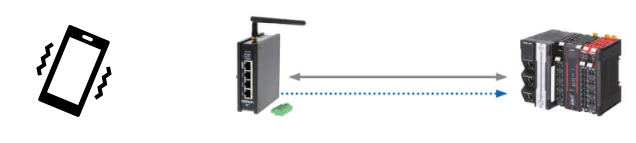
SMS with Sysmac and RT100The picture on the right shows the principle, with the RT100 and a Sysmac Controller connected via Ethernet. When an alarm occurs, the CPU sends an SMS to the RT100, which forwards it to a mobile phone. The phone user acknowledges the SMS, and the message goes back to the CPU. When the CPU receives the acknowledgement (for the alarm), it is recorded in the alarm table, and a confirmation is sent back to the mobile phone that the acknowledgement was received. The system can store a large number of different text messages and phone numbers. You create a table of who should receive which messages. You can also send commands or messages to the CPU from the phone if you want to build in more functions. This can be useful for changing a phone number or a setpoint in the process. You'll find the function block RT100_SMSAlarm here on Support Norway in OEN_CommunicationSecure. To handle digital and analog alarms, we recommend the function block Alarms in OEN_BaseBlocks, which you can connect to RT100_SMSAlarm. |
Alarms and SMSAlarmThe Alarms FB keeps track of the status of all alarms. |
Was this article helpful?
That’s Great!
Thank you for your feedback
Sorry! We couldn't be helpful
Thank you for your feedback
Feedback sent
We appreciate your effort and will try to fix the article