The problem why the NE1A-SCPU01L or NE1A-SCPU02L is not in the "Network Configurator" is that the EDS file may be installed incorrectly. Here is how you can fix it:
1: Go to the EDS catalog and change the end to .eds.
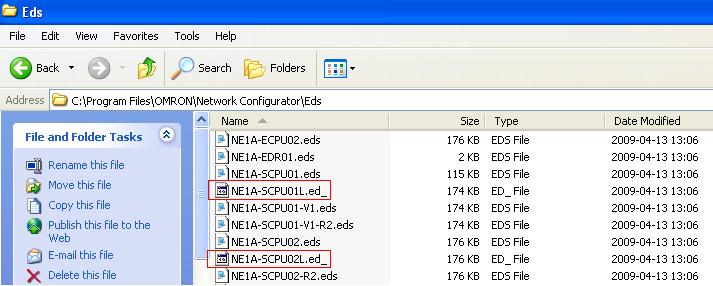
2: After changing the extension from ed_ to eds, go to the Network Configurator and install the eds files.
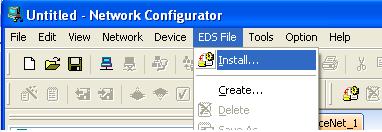
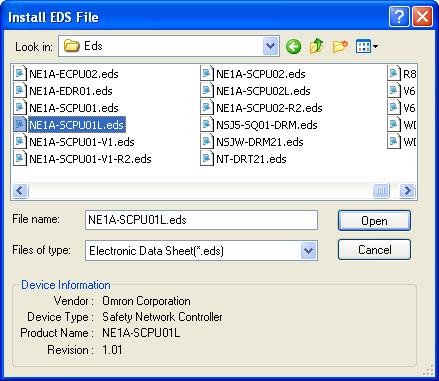
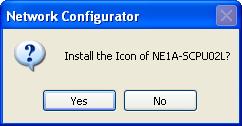
3: Even an icon can be added, and you can find them under the the folder: C:\Program Files\OMRON\Network Configurator\Icon\Sys
.jpg)
4: After this steps you have added the NE1A-SCPU01L to your Network Configurator.
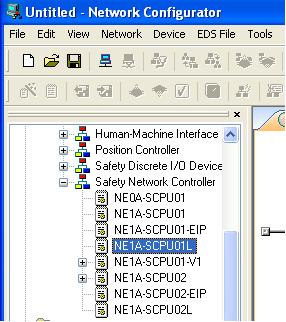
These 4 steps have now added the NE1A-SCPU01L type to the catalog so this device can now be added to your network.
Was this article helpful?
That’s Great!
Thank you for your feedback
Sorry! We couldn't be helpful
Thank you for your feedback
Feedback sent
We appreciate your effort and will try to fix the article