Use F03-11 Protective Covers.
Mounting F03-11 Protective Covers (Sold Separately)
The Protective Cover can be mounted only by using F03-12 Frames (sold separately) as a flange, or by using F03-12 and F03-13 Frames (both sold separately) together and embedding them in a concrete tank.
Using Protective Covers for PS-[]S (R)-series Electrode Holders
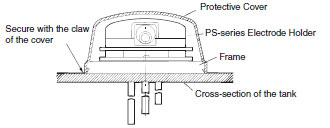
Attach F03-12 Frames to the bottom of PS-series Electrode Holders. (See figure below.)
Next, place F03-11 Protective Covers on top of the Electrode Holders and press on it until it clicks into place.
Mounting F03-11 Protective Covers (Sold Separately)
The Protective Cover can be mounted only by using F03-12 Frames (sold separately) as a flange, or by using F03-12 and F03-13 Frames (both sold separately) together and embedding them in a concrete tank.
Using Protective Covers for PS-[]S (R)-series Electrode Holders
Attach F03-12 Frames to the bottom of PS-series Electrode Holders. (See figure below.)
Next, place F03-11 Protective Covers on top of the Electrode Holders and press on it until it clicks into place.
Note:The cap screw attached to the Protective Covers are not required for mounting.
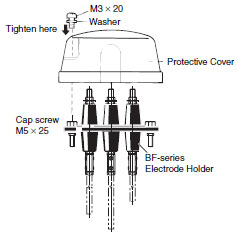
Using Protective Covers for BF-series Electrode Holders (Applicable to BF-3(R), -4(R), and -5(R))
Remove the two mounting screws (M5 x 25) of BF-series Electrode Holders and attach the two cap screws (M5 x 25) provided with F03-11 Protective Covers.
Next, put Protective Covers over the top of BF-series Electrode Holders, and then tighten the two enclosed screws (M3 x 20 with washers). See figure below.
Was this article helpful?
That’s Great!
Thank you for your feedback
Sorry! We couldn't be helpful
Thank you for your feedback
Feedback sent
We appreciate your effort and will try to fix the article