A time switch like the one described can be easily programmed using the clock built into the CPU Unit.
Program and Operation Explanation
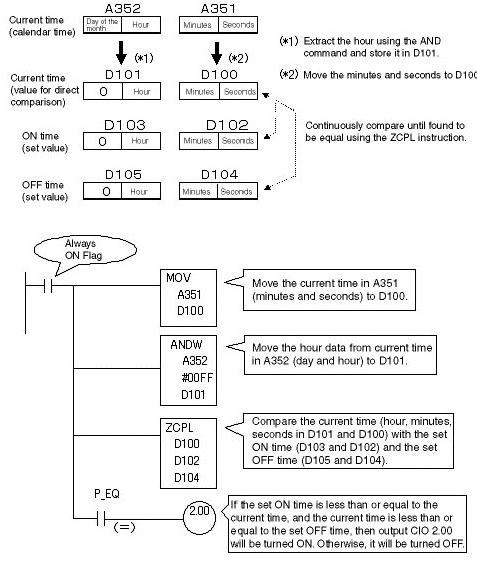
Store the desired times to turn ON or OFF a particular machine in DM Area words of your choice. Then use the DOUBLE AREA RANGE COMPARE instruction (ZCPL) to continuously compare the time on the clock built into the CPU Unit to the time stored in the DM Area, the turning ON and OFF of machines and devices can be controlled individually.
Note:When using CS1/CJ1 PLCs, the output words for the current time from the calendar time (A352/A351) are shown as the word address. Refer to the Programming Manual for the relevant PLCs.
Program and Operation Explanation
Store the desired times to turn ON or OFF a particular machine in DM Area words of your choice. Then use the DOUBLE AREA RANGE COMPARE instruction (ZCPL) to continuously compare the time on the clock built into the CPU Unit to the time stored in the DM Area, the turning ON and OFF of machines and devices can be controlled individually.
Note:When using CS1/CJ1 PLCs, the output words for the current time from the calendar time (A352/A351) are shown as the word address. Refer to the Programming Manual for the relevant PLCs.
Was this article helpful?
That’s Great!
Thank you for your feedback
Sorry! We couldn't be helpful
Thank you for your feedback
Feedback sent
We appreciate your effort and will try to fix the article