Sockets are communication lines in and out of the Ethernet port on the CPU. Each line is defined by a port number, so you can have many such lines open on the Ethernet port at the same time. There are a number of standard port numbers for different protocols, so stay away from these if you're creating your own protocols. Some of our CPUs with Ethernet have 0 sockets, others have 60. Modbus/TCP and MQTT are examples of protocols that use sockets. In Sysmac Studio, functions/FBs related to sockets have the prefix Skt. A socket can send/receive up to 2000 bytes per transmission.
Socket communication typically works like this:
Connect, Receive, Send, Receive, Send … Close (if the CPU is responsible for establishing the connection)
or
Accept, Receive, Send, Receive … (if another CPU is responsible for establishing the connection)
The data traffic doesn't have to go both ways.
Everyone using sockets should enable Keep Alive. Set it to 1 s instead of 300. Keep Alive monitors the sockets. If no data passes through the socket within the selected time, Keep Alive sends requests ("Hello? Is anyone there?") to the other side. After 5 failed attempts, the port is closed. Your program must re-establish communication, but Keep Alive makes sure sockets don't stay open and blocked for several minutes. The pause between attempts is 2 or 5 seconds, depending on the CPU.
TLS
TLS secure sockets on NX102/NX1P2 are encrypted communication lines that require keys (SAS tokens/symmetric key) or certificates at both ends for encryption and decryption.
To enable TLS in the CPU, use tlsconfig.exe, located in the Sysmac Studio folder on your hard drive. The program must be run in a Command Prompt window in Windows. If you only need a token, the command is fairly simple: tlsconfig setSessionInfo /id 0 /f /ip:192.168.250.1
0 refers to the session ID, f = overwrite, and ip is the CPU. See the procedure in the manual when using certificates.
A secure socket currently cannot respond to incoming connections. Also make sure the CPU has firmware 1.46 or later. Ref. manual W506.
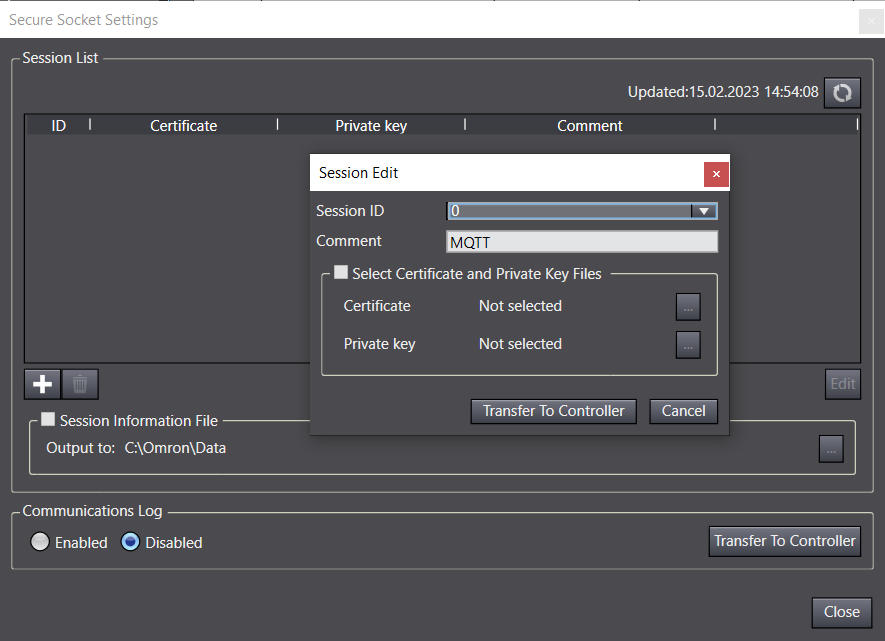
Controller > Security > Secure Socket Setting…
From version 1.53, TLS configuration is built into Sysmac Studio to make it easier to set up, so you no longer need the Command Prompt. Make sure you are online with the CPU when you do this.
Socket ServiceSYN = Connection Request Use port numbers between 49152 and 65535 for your own protocols. | Socket Service TCP statesSktGetTCPStatus FB (_eCONNECTION_STATE) closed (1) | TCP vs UDPWith TCP, a connection is established, then data is sent, and finally the connection is closed. Connection setup and data reception are always acknowledged (ACK). With UDP, data is sent directly to the receiver. (Roughly like sending a text message.) |
Example of using MQTT with AWS and Azure here. | Here is an overview of Ethernet ports and other useful information. |
Was this article helpful?
That’s Great!
Thank you for your feedback
Sorry! We couldn't be helpful
Thank you for your feedback
Feedback sent
We appreciate your effort and will try to fix the article