Objectives
Introduction
This article (and attached full document) provides help in advising specific settings to use ‘User Defined Status Area’. Please make reference to manual (Ref W495 - CJ1W-EIP21 for NJ-series CPU Operation Manual) when using this article.
Once this setting has been selected, the status of up to 256 Tag DataLink connections can be mapped into the NJ CPU via a Global Variable.
Content
Before the Global Variable can be created with the correct data type; the data type must be included in the project by registering it from the CPU backplane configuration from the CJ1W-EIP21 setup.
.png)
Now a variable can be defined using this data type.
.png)
Note - the variable must be set to Network Publish (as Input) as the CJ1W-EIP21 uses tag name to transfer the data.
Now the newly defined (and network published) variable can be selected in the Setup of the CJ1W-EIP21
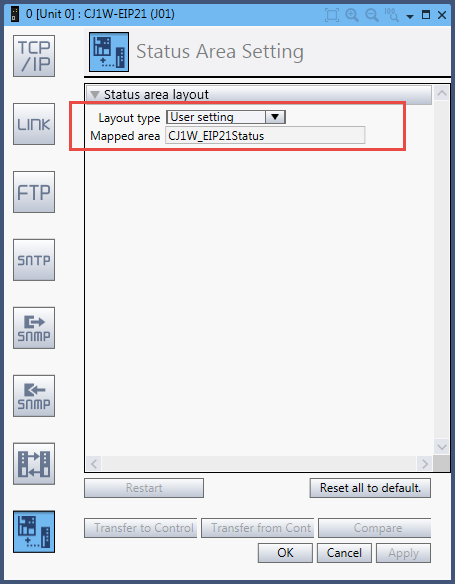
Once set, then information can then be used to verify current status of Slaves Tag Datalink Status in Sysmac Application program.
Summary
References
Was this article helpful?
That’s Great!
Thank you for your feedback
Sorry! We couldn't be helpful
Thank you for your feedback
Feedback sent
We appreciate your effort and will try to fix the article