On some systems trying to run the CX-Supervisor Runtime from the Developer can result in the following error. This most often seen immediately after CX-Supervisor installation, or after other third party software has been installed:
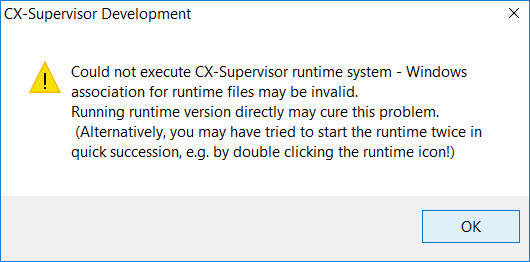
Cause
CX-Supervisor Developer makes use of Windows File Associations to launch the runtime. This is the same system that allows you to double click a document in Windows Explorer. CX-Supervisor Runtime uses the SR2 file extension but this problem can be caused if other software also registers itself to launch for the SR2 file extension.
 |
This issue also affects Windows 10 users, where the Standard "Photo Viewer" app can take the SR2 file association. After Windows Updates or changes to the "Default Apps" settings Windows will also reset these file associations. |
Solution
The best and easiest solution is to update to CX-Supervisor version 3.4 or later, where the Runtime file extension has been changed to SR3 in order to avoid this situation. Upgrades can be downloaded for free by registered customers. See How Do I Download Software Updates? for more information.
Alternatively you can manually update the file associations, by finding your SR2 file with Windows Explorer and selecting "Open With..." and choosing "CX-Supervisor Runtime" and using the "Always use this app" option. However the much easier method is to launch the Runtime manually, which automatically re-registers its file associations (for users with access permissions):
- Press Windows button
- Type "CX-Supervisor Runtime" to find the application shortcut
- Click the shortcut to launch the application
This should resolve the error.
Was this article helpful?
That’s Great!
Thank you for your feedback
Sorry! We couldn't be helpful
Thank you for your feedback
Feedback sent
We appreciate your effort and will try to fix the article