Some times the CX-Programmer "Print" menu may appear grey and disabled. This could be for a couple of reasons:
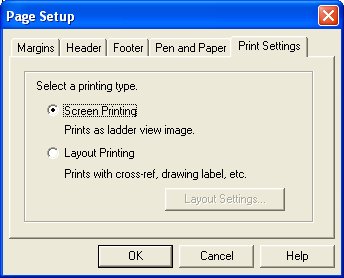
Most common cause is incorrect setting of the "Print Settings" in the Page Setup dialog. For printing of SFC charts and Structured Text this must be set to "Screen Printing" rather than "Layout Printing":
The Print menu will also be disabled if there is no Windows Printer installed. Check the Printers in Control Panel or try printing from another Windows application.
Was this article helpful?
That’s Great!
Thank you for your feedback
Sorry! We couldn't be helpful
Thank you for your feedback
Feedback sent
We appreciate your effort and will try to fix the article