From time to time some users reports error messages related to CX-Server.
In general CX-Server acts as the link between software and hardware within the CX-One suite—much like a printer driver in an office environment.
As an example; if you use Microsoft Excel and click "Print," Excel communicates with the printer driver, which in turn communicates with your printer. The same applies for Word, PowerPoint, etc..
That said, if there are any issues with the printer driver, you can't print.
In Omron’s CX-One suite, applications like CX-Programmer, CX-Designer, and CX-Drive all communicate with CX-Server, much in the same way. CX-Server relays the communication from the software's to the hardware in the form of a PLC, HMI, VFD etc. It performs the same function, and when it fails, the process halts in the same way.
That said the solution is often to restart your PC and if the problem persists, try uninstalling and reinstalling CX-One completely. To ensure a clean slate and remove any lingering old files or settings, we recommend using a dedicated utility called CX-Remover.
You can find this tool on the CX-One installation media / ISO file.
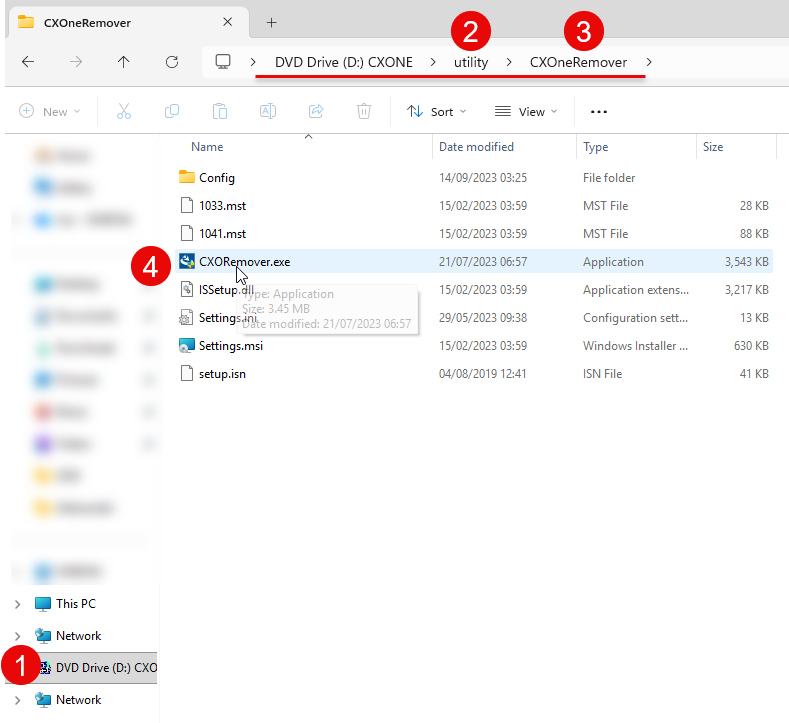
Run this software to delete all old registry entries and files and then perform a full, standard installation using the same ISO file.
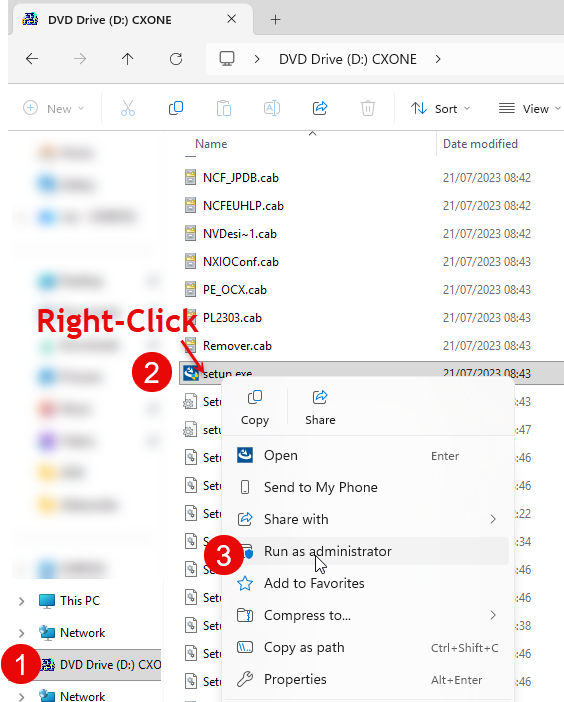
When doing the re-install, It is never a bad idea to right-click the installation file and select "Run as administrator" to ensure proper permissions.
Was this article helpful?
That’s Great!
Thank you for your feedback
Sorry! We couldn't be helpful
Thank you for your feedback
Feedback sent
We appreciate your effort and will try to fix the article