Sysmac-NCT is a program for the configuration of the NC module.
Settings for use in Windows 95/98/NT
When trying to download parameters the NC module can have a long error list displaying that the "dwell-time" is not valid. This is because the comma separator in Windows is wrong. The program is based on the use of English settings, where the comma separator is the equivalent to European full stops. This needs to be changed for the program to run correctly.
Settings for use in Windows 95/98/NT
When trying to download parameters the NC module can have a long error list displaying that the "dwell-time" is not valid. This is because the comma separator in Windows is wrong. The program is based on the use of English settings, where the comma separator is the equivalent to European full stops. This needs to be changed for the program to run correctly.
How to change:
Change it back after use.
- Go to the Control Panel in Windows. Start → Settings → Control Panel
- Select the icon "Regional Settings"
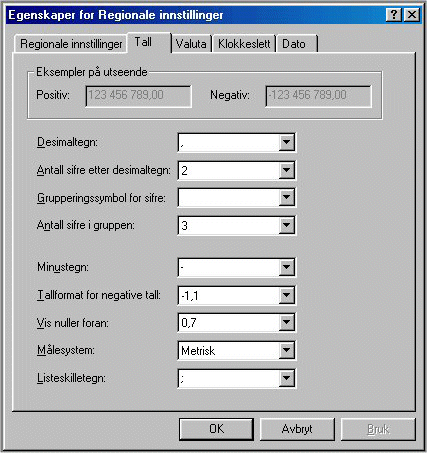
- Change the "Decimal" from the character comma (,) to the period character (.) Under "Number"
- Enable "Use" or "OK"
- NCT program can now be used as usual!
Change it back after use.
Was this article helpful?
That’s Great!
Thank you for your feedback
Sorry! We couldn't be helpful
Thank you for your feedback
Feedback sent
We appreciate your effort and will try to fix the article