Both the CONDITION ON (UP) and CONDITION OFF (DOWN) instructions were added with the introduction of the CS/CJ-Series, but here we will explain only the CONDITION ON (UP) Instruction.
CONDITION ON Instruction (UP) Operation Specifications
When the execution condition to UP turns ON, the execution condition output from UP will turn ON for 1 cycle.
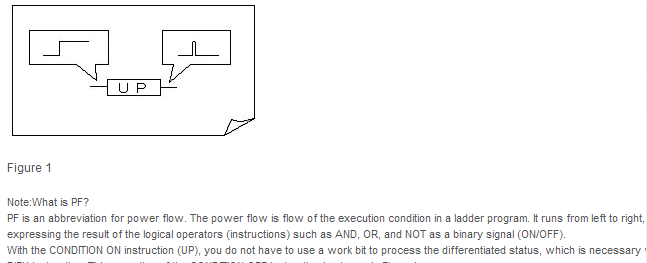
Differences between CONDITION ON Instruction (UP) and Other Differentiated Instructions
The differences between --|↑|--, the DIFU instruction, and the CONDITION ON instruction (UP) are given in Table 1.
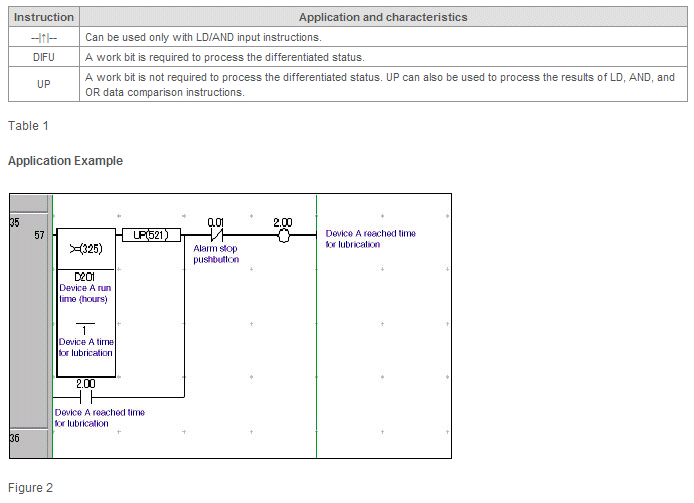
Program Operation
1.When the Device A Run Time (D201) reaches the Device A Time for Lubrication (CIO 1), the CONDITION ON instruction (UP) causes the execution condition to turn ON for one scan, which will turn ON the Device A Reached Time for Lubrication Bit (CIO 2.00) will turn ON. The self-holding bit (CIO 2.00) will cause the warning bit to remain ON.
2.When the Alarm Stop Pushbutton Bit (CIO. 0.01) turns ON, the self-holding bit will be reset, and the alarm output bit (CIO 2.00) will turn OFF.
Reference:
We have explained the CONDITION ON instruction (UP) here. The CONDITION OFF instruction (DOWN) is different only in that, when the input signal turns OFF, the execution condition will turn ON for one cycle. The other characteristics of the CONDITION OFF instruction (DOWN) are the same as those of the CONDITION ON instruction (UP).
Was this article helpful?
That’s Great!
Thank you for your feedback
Sorry! We couldn't be helpful
Thank you for your feedback
Feedback sent
We appreciate your effort and will try to fix the article