.NET framework and .NET framework ServicePack 1 need to be installed on your PC to be able to run CX Profibus.
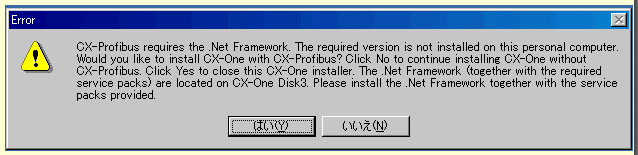
When Installing CX One 1.1 for the first time, if you insert the CD1 inside your CD player, you will get the error message ".Net framework is not installed on your PC..."
If you answer no then the installation of CX One will continue but you will not have installed CX Profibus.
If you answer yes then the installation of CX One will be stopped. You need to manually insert CX One CD3 inside your CD player and run dotnetfx.exe inside the CD3/DotNetFramework folder. When you have finished, you also need to run NDP1.1sp1-KB867460-X86.exe in the CD3/DotNetFramework/SP1 folder.
Then reboot your PC
Once the PC has rebooted, you can insert CD1 and install the CX One package including CX Profibus
When Installing CX One 1.1 for the first time, if you insert the CD1 inside your CD player, you will get the error message ".Net framework is not installed on your PC..."
If you answer no then the installation of CX One will continue but you will not have installed CX Profibus.
If you answer yes then the installation of CX One will be stopped. You need to manually insert CX One CD3 inside your CD player and run dotnetfx.exe inside the CD3/DotNetFramework folder. When you have finished, you also need to run NDP1.1sp1-KB867460-X86.exe in the CD3/DotNetFramework/SP1 folder.
Then reboot your PC
Once the PC has rebooted, you can insert CD1 and install the CX One package including CX Profibus
Was this article helpful?
That’s Great!
Thank you for your feedback
Sorry! We couldn't be helpful
Thank you for your feedback
Feedback sent
We appreciate your effort and will try to fix the article