In CX-Supervisor v3 CX-Simulator is integrated so you can simulate one of your PLCs with its CX-Programmer program with a single click... Just choose 'Run with Simulator' from the Project menu in the developer:
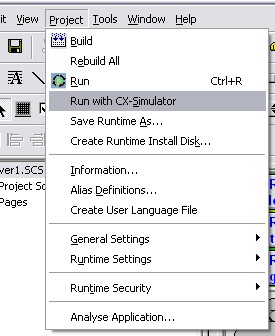
This will build your and run your runtime in the same way as if you were running with a real PLC. However, once the runtime has started you will be prompted to link one of your project PLCs with a CX-Programmer project:
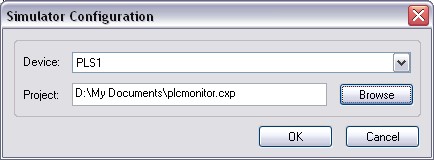
This will then launch CX-Programmer and run your program in CX-Simulator. CX-Supervisor will connect to this simulated PLC.
 |
Note: For this function to work you need CX-One installed on your computer, with CX-Programmer and CX-Simulator options installed. If these are not installed then the "Run with CX-Simulator" option is disabled and shown greyed out. |
Using CX-Simulator directly from CX-Supervisor (for versions earlier than v3)
If you are using a version of CX-Supervisor earlier than v3 you can reconfigure your project to connect directly to CX-Simulator. To achieve this follow these steps:
- Start CX-Simulator from the windows Start menu.
- Select 'Create New PLC'
- Select the required PLC Type
- No need to register I/O ---> Next
- Keep default Virtual Comms Unit ---> Next
- Keep default Comm Port ---> Next
- Create the data folder ---> Finish
- In the work CX-Simulator dialogue, connect to the virtual PLC.
- Start the virtual PLC. It must be started first for CX-Supervisor to be able to open the device.
- In CX-Supervisor project, set the PLC type as per CX-Simulator or FinsGateway.
- Set the communication type as per CX-Simulator setup e.g. default is Controller Link, Network 1 Node 10 Unit 0
When the CX-Supervisor project is run, communication with the virtual PLC will be established. All PLC aspects of CX-Supervisor will work with CX-Simulator as if it were a real PLC
Was this article helpful?
That’s Great!
Thank you for your feedback
Sorry! We couldn't be helpful
Thank you for your feedback
Feedback sent
We appreciate your effort and will try to fix the article