Step by Step Downloading a Protocol Macro

Modified on Thu, 9 Oct, 2025 at 3:47 PM

Introduction
Screenshots guiding the User through the download of a protocol macro onto a Serial Communication Unit to be used via PMCR instruction.
  • Create a connection between the PC and the PLC programming port.
  • Start CX-Protocol and open via pull-down-menu. File > Open the protocol.
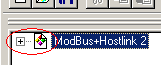
  • Click the ‘plus’ [+] shown in front of the protocol-name to expand the protocol-list.

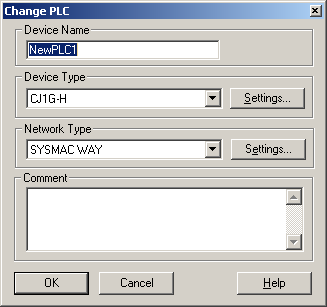
  • Right-click on the PLC and select in the menu "Edit PC-PLC Comm Settings"
  • Select the right PLC and communication protocol to the PLC.

  • Finalise by pressing "OK" . Right-click again the PLC and select "Connect To PLC". CX-Protocol should go 'online' with the PLC.
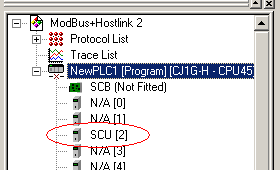
  • Check the list and select the SCU/SCB-unit. If this unit is not visible in the 'I/O-table', this table needs to be created: Right-click the PLC, select 'I/O-table', in the newly opened menu choose the pull-down menu: 'Options' then 'Create'. If you cannot select this your PLC needs to be switched to program-mode.

  • Click on 'Protocol List' and a new screen will be opened. In the column 'Target' select the right SCU/SCB as mentioned in the list underneath the PLC-CPU, open the fold-down menu by clicking the cell and select the target SCU/SCB.

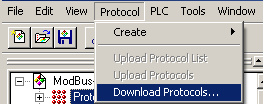
  • After the right target(s) is selected, click again the 'Protocol List'. Select in the pull-down menu: 'Protocol' then 'Download Protocols'.

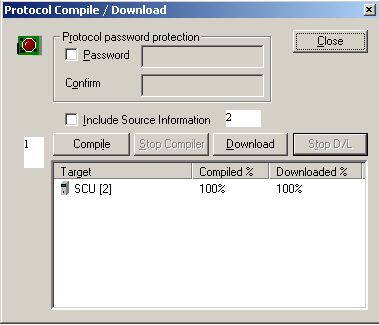
  • Click 'Compile' followed by 'Download', the protocols will be downloaded to the Serial Communication Unit/Board. If asked to set the PLC in 'Programming Mode' choose 'Yes'.

The Protocols are now loaded in the Serial Communication Unit/Board and are now ready to be used via the PMCR instruction.


Was this article helpful?

That’s Great!

Thank you for your feedback

Sorry! We couldn't be helpful

Thank you for your feedback

Let us know how can we improve this article!

Select at least one of the reasons
CAPTCHA verification is required.

Feedback sent

We appreciate your effort and will try to fix the article