If you're switching to a new panel, you can check out the attached PDF to see whether it fits the cut-out from the old one.
| Model | Software | Comment |
|---|---|---|
| NT10S | NT10S Support Tool (DOS program) | LCD screen with function keys. |
| NT11 | NTST | Graphic screen, monochrome, with function keys and keypad. |
| NT2S/3S | NTXS | LCD screens with function keys. |
| NT4S/15S/18S | NTFK | LCD screens with function keys. |
| NTH25 | NTST | Handheld graphic screens, monochrome and colour. |
| NT20/30/31/620/625/631 | NTST | Graphic touchscreens, monochrome and colour. The application can be converted to CX-Designer. |
| NT20S/600S/620S | NTST | Graphic touchscreens, monochrome. The application can be converted to CX-Designer. |
| NT21S | NTST | Graphic touchscreen, monochrome. The application can be converted to CX-Designer. |
| NQ | NQ-Designer | Small colour touchscreens with function keys. |
| NS | CX-Designer | Graphic touchscreens, monochrome and colour. |
Converting from NT to NS
Attached is a general guide for converting from NT to NS.
The program must be uploaded from the screen with the NTST software, saved as *.mmi, and then opened with the NT31C_631C Conversion Tool in CX-One.
Some applications, such as NT20/NT21, must therefore first be converted to NT31C before they can be saved as *.mmi.
Finally, open the converted application in CX-Designer and check that everything is correct before downloading it to the NYE, which replaces the old NS panels.
Cables for NT2S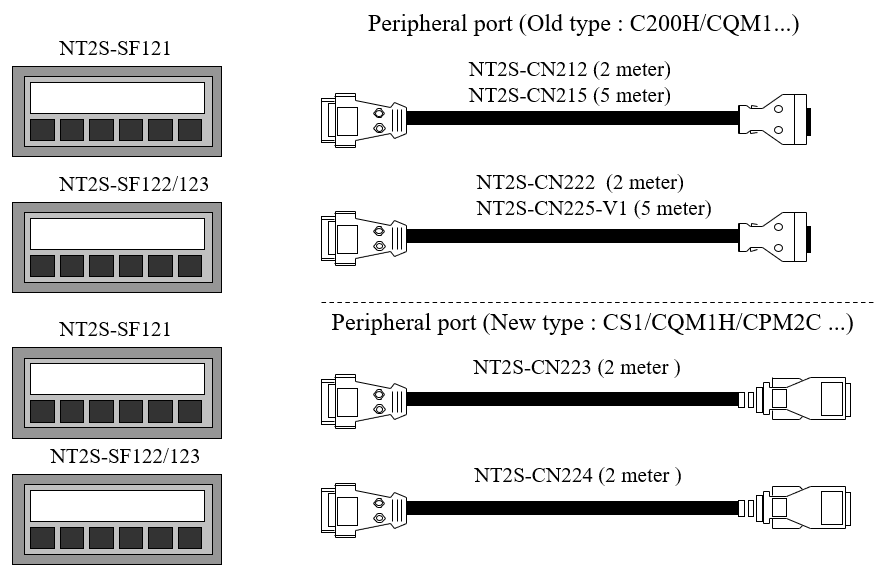 Cables for other NT panelsCheckout the attached documents and see if you can find any cables. | Using NT30C and NT600S with CS1Note that ONLY DM and CIO can be used as Control/Notify areas in the CS1 with NT30C. In general, use only DM and CIO to avoid problems. System menuPress two corners of the touchscreen at the same time. NT31 System Installer modePress the top-left corner while switching on the power to the panel. |
Was this article helpful?
That’s Great!
Thank you for your feedback
Sorry! We couldn't be helpful
Thank you for your feedback
Feedback sent
We appreciate your effort and will try to fix the article