Introduction
This article explains how to set up a starting page in NA HMI. If you want to learn more about pages in the NA, please read "Introduction To Pages On The NA" article.
Default Startup page
When a new NA HMI project is started, Sysmac Studio automatically creates a new blank page called "Page0".
By default, this page will be set up as a Startup page.
Changing Startup page
The Startup page can be changed in Multiview Explorer under "Configuration and Setup" -> "HMI settings". A Drop down list allows user to choose a new startup page.
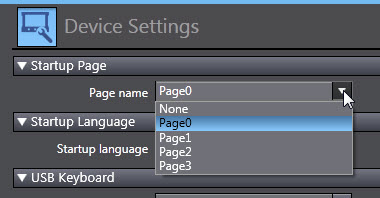
 |
Note: Pop-up pages can not be configured as Startup pages. |
A Startup page has to be selected otherwise Sysmac Studio will indicate an error:
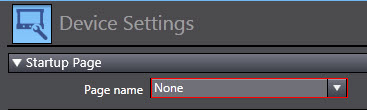
Without a Startup page, the project will fail to build with the following error message:

| |
Note: If currently selected Startup page is deleted, it is necessary to select a new one, otherwise the Sysmac Studio project will not build successfully. |
See Also:
Was this article helpful?
That’s Great!
Thank you for your feedback
Sorry! We couldn't be helpful
Thank you for your feedback
Feedback sent
We appreciate your effort and will try to fix the article