Overview
This article explains how to publish an IAG collection (project). If you want to learn more about IAGs please read 'What Are NA IAGs?' article. For the purposes of this article, it is assumed that you have already created your IAG Collection, and it is built with no errors. To learn more about creating IAGs please read ‘Creating Your First NA IAG’ article.
Publishing IAG
Once your IAG Collection (project) is ready to be published go to ‘project’ menu and select ‘Publish IAG Collection …’ option
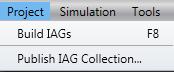
This will pop up a dialog. Here you will be able to select folder in which your .iag file will be created.
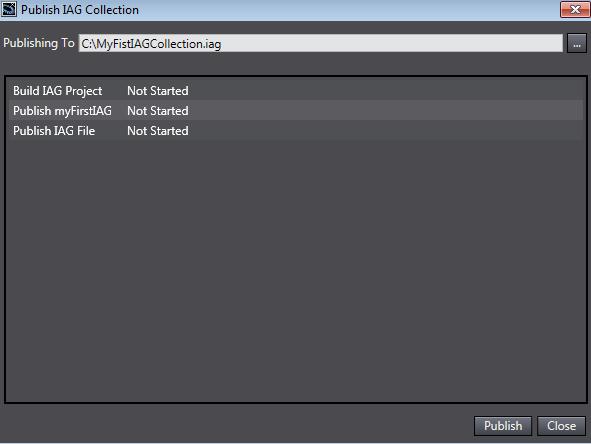
Once publish path and file name specified, click ‘Publish’ button.
Publishing process will be started. When publishing process finishes successfully you will see the following:
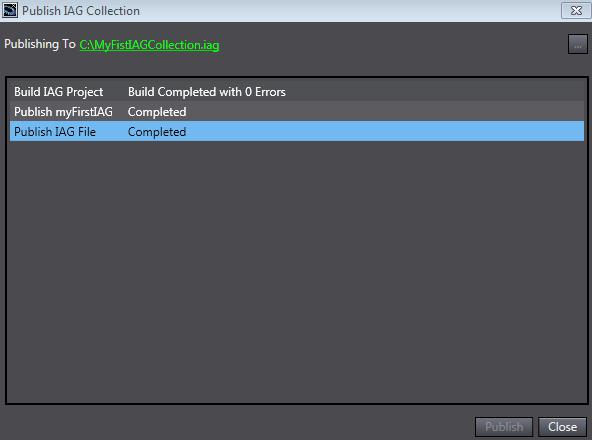
The .iag file will be created in the path provided. This file can be used to distribute the IAG Collection on any PC with proper Sysmac Studio version installed.
If you want to learn more about how to add IAG to your ‘standard’ NA project, please read 'Introduction To Using IAGs' article.
See Also:
Was this article helpful?
That’s Great!
Thank you for your feedback
Sorry! We couldn't be helpful
Thank you for your feedback
Feedback sent
We appreciate your effort and will try to fix the article