IntroductionThis article provides details for the use and application of the Speed Control (DINT) function block. Using this function block with the CJ2M-MD21/MD212 provides an easy means of controlling a servo's speed. This function block can be of particular use in PLC-based motion control applications often found in packaging machinery. To see a machine case study of a packaging application that controls servos with the CJ2-Series Pulse Output Unit, visit the link below at the packaging solutions area:
|
 |
Name |
Speed Control (DINT): MD_CPU031_MoveVelocity_DINT |
Basic Function |
Controls speed. |
||
Symbol |
|
||
Originates from |
Tsunagi Lab Europe |
||
Created by |
OEE-HQ HvB (creation and testing) |
||
File Name |
MD_CPU031_MoveVelocity_DINT.cxf |
||
Applicable models |
CPU Unit |
CJ2M-CPU Unit version 2.0 or higher with max. two
|
|
CX-Programmer |
Version 9.1.2 or higher |
||
Conditions for usage |
None. |
||
Function Description |
Executes speed control for the output specified with the Axis No. (Axis) using the Speed command (Velocity) when Start (Execute) is turned ON.
|
||
Kind of FB definition |
Connect Always ON type
|
||
FB Precautions |
• When using the Pulse output 0&1 or 2&3 simultaneously, use the same Pulse output method for them.
|
||
EN input condition |
• Connect the EN input to the Always ON Flag (P_ON).
|
||
Restrictions other |
• During positioning operation, this FB can not be executed.
|
||
Application example |
Turning the start trigger from OFF to ON will start operating the Servomotor connected to the Pulse output 0 on the CJ2M-MD21* Unit with relative movement.
|
||
Related manuals |
CJ2M Pulse I/O User Manual (W486)
|
||
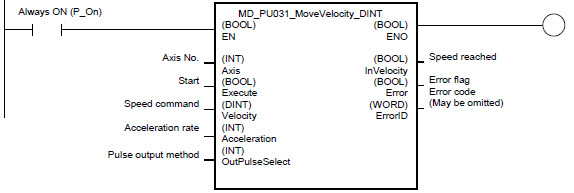
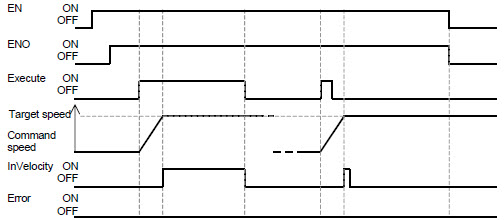
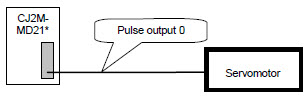
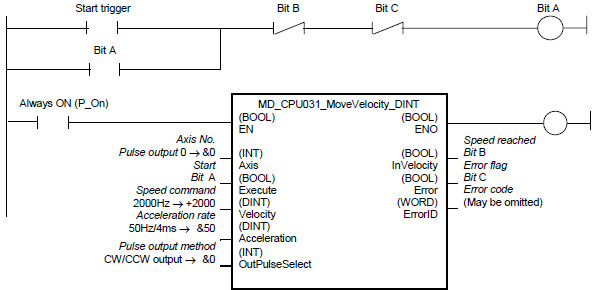
-
Variable Table
Input Variables
Name |
Variable name |
Data type |
Default |
Range |
Description |
|---|---|---|---|---|---|
EN |
EN |
BOOL |
|
|
1 (ON): Starts FB
|
Axis No. |
Axis |
INT |
&0 |
&0 to & |
&0: Pulse output 0, &1: Pulse output 1
|
Start |
Execute |
BOOL |
0(OFF) |
|
OFF -> ON (rising edge) starts speed control |
Speed command |
Velocity |
DINT |
+0 |
-100000 to +100000 |
Specifies the target speed.
|
Acceleration rate |
Acceleration |
INT |
&1 |
&1 to &65535 |
Specifies the acceleration rate.
|
Pulse output method |
OutPulseSelect |
INT |
&0 |
&0 to &1 |
&0: CW/CCW output
|
Output Variables
Name |
Variable name |
Data type |
Range |
Description |
|---|---|---|---|---|
ENO |
ENO |
BOOL |
|
1 (ON): FB operating normally
|
Speed reached |
InVelocity |
BOOL |
|
1 (ON) indicates that the target speed has been reached. |
Error flag |
Error |
BOOL |
|
1 (ON) indicates that an error has occurred in the FB. |
Error code (May be omitted) |
ErrorID |
WORD |
|
The error code of the error occurred in the FB will be output. For details of the errors, refer to the sections of the manual listed in the Related manuals above. When Unit No. or Axis. No. is out of the range, #0000 will be output. |
Revision History
Version |
Date |
Contents |
|---|---|---|
1.00 |
16-Feb-2012 |
Based on Function Block: _NCCPU031_MoveVelocity_DINT |
Note
This manual is a reference that explains the function block functions. It does not explain the operational limitations of Units, components, or combinations of Units and components. Always read and understand the Operation Manuals for the system’s Units and other components before using them.
Was this article helpful?
That’s Great!
Thank you for your feedback
Sorry! We couldn't be helpful
Thank you for your feedback
Feedback sent
We appreciate your effort and will try to fix the article