You can set the PLC clock time by using some internal CX-Server functions provided with CX-Supervisor.
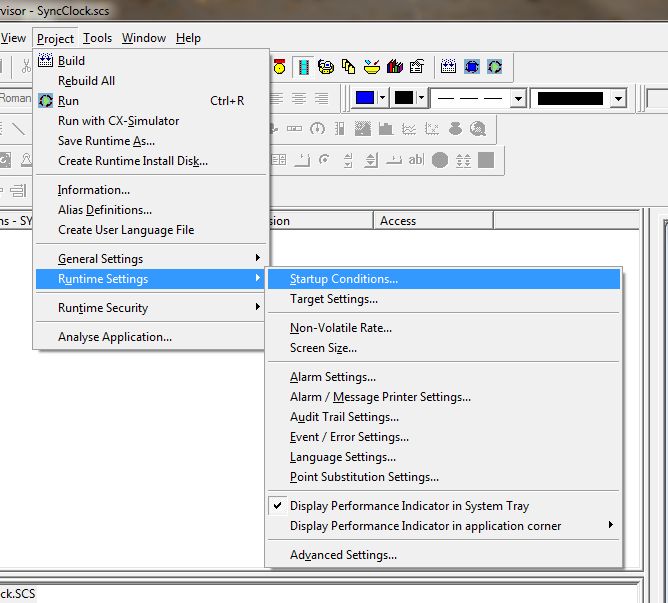
These extra functions can be enabled by Selecting Project Settings followed by Runtime settings and Startup Conditions:
You can then choose to use the CXServer Control in your project:
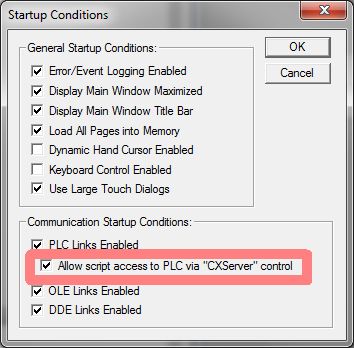
This control adds a number of features which are documented in the online help. These features include the ability to get or set the PLC clock.
Here is some example code to set the PLC clock:
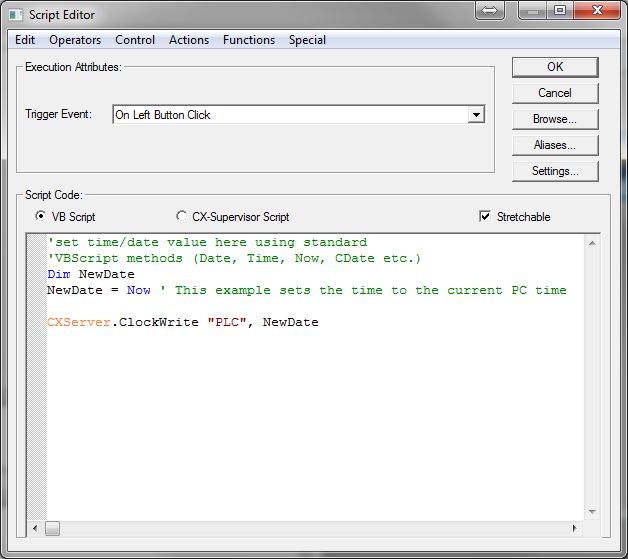
The CX-Server control offers many other features including:
- CXServer.ClockRead
- CXServer.ClosePLC
- CXServer.DownloadProgram
- CXServer.GetDeviceConfig
- CXServer.RawFINS
- CXServer.RunMode
- CXServer.SetDeviceAddress
- CXServer.SetDeviceConfig
- CXServer.UploadProgram
For full details of the script syntax for these functions see the CX-Supervisor Script Reference Manual, Appendix B
Was this article helpful?
That’s Great!
Thank you for your feedback
Sorry! We couldn't be helpful
Thank you for your feedback
Feedback sent
We appreciate your effort and will try to fix the article