mode at every startup.
Automatic Execution Mode
When this mode is selected and the following operations are performed, the NE1A-series Controller starts up in RUN Mode thereafter.
• Configuration lock
• Power supply interruptions after switching to RUN Mode.
IMPORTANT When the power supply is interrupted in IDLE Mode, the NE1A-series Controller will not start in RUN Mode at the next startup even though Automatic Execution Mode is set and the configuration is locked. Make sure to turn OFF the power supply in RUN Mode.
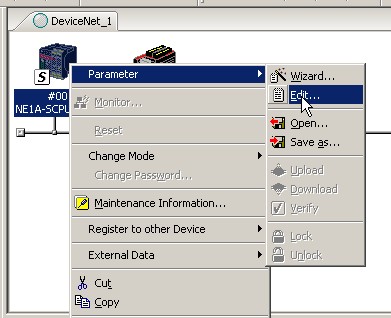
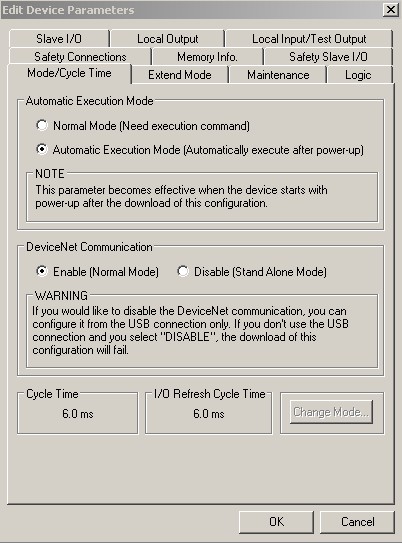
To set the mode in Network Configurator software double click on the Icon for the NE1A controller to bring up the 'Edit Device Parameters' window. Select the 'mode/Cycletime' tab. You will see the 'Automatic Execution Mode' selection here.
Click on controller icon (text background turns blue) and then right mouse click for options.
this window appears when edit has been clicked
To see a machine case study utilizing an NE1A safety network controller, click the link below.
Was this article helpful?
That’s Great!
Thank you for your feedback
Sorry! We couldn't be helpful
Thank you for your feedback
Feedback sent
We appreciate your effort and will try to fix the article