NS Serial Connection With PLCs

Modified on Thu, 9 Oct, 2025 at 3:47 PM

Introduction
This tutorial is intended as a supplement to the original manuals for the products. Therefore use it only to become familiar with the product, and not as guide for a complete installation.
 
This document shows what one must do to get the serial connection between an Omron NS operator panel and an Omron PLC
(CJ1M in this example) within the context of CX-Programmer 5.0 and NS-Designer 6.0.

Settings on the NS Panel
 
Start NS-Designer, and create new project or open existing.
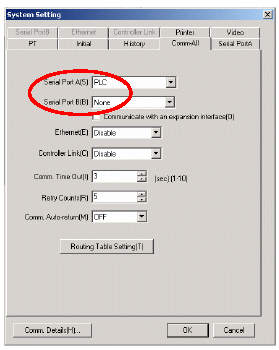
Select Settings-> System Setings. Select All-Comm sheet and set Serial Port A or
B to "PLC".
NS Designer settings
NS Designer Settings

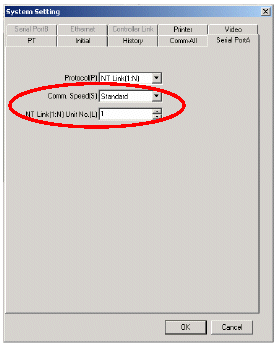
Select the Serial Ports tab 
and set NT Link (1: N) to Unit No. 1 and select Standard or High-Speed communication speed
(Comm. Speed).


Communication settings are now 38,400 (Standard) / 115200
(High-Speed), 8, N, 1

Close the window with OK, and lastly Download the whole project to NS panel at the port that is set to None.


Settings on the PLC

Start CX-Programmer, and create new project or open existing.


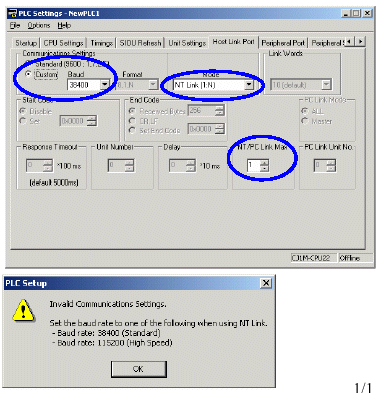
Double click on Settings in the Project menu on the left of the screen. Select Host Link Port, and seen Communications Settings for Custom.


Set Baud to 38400 (Standard) or 115200 (High Speed), and Moderate to NT Link (1: N), and NT / PC Link Max to 1 as per the error message.


Close the window, and download the entire Settings to the PLC while it is in the Stop / Program mode.

PLC settings in CX-Programmer connecting to NS


Was this article helpful?

That’s Great!

Thank you for your feedback

Sorry! We couldn't be helpful

Thank you for your feedback

Let us know how can we improve this article!

Select at least one of the reasons
CAPTCHA verification is required.

Feedback sent

We appreciate your effort and will try to fix the article