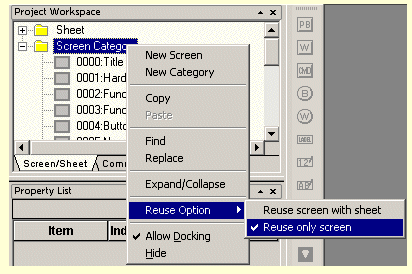
CX-Designer will normally only copy screens from one project to another. If a sheet is used it will not be copied. If you want to copy the sheet also you need to select the option ‘Reuse screen with sheet’ in the source project. To do this Right-Click in screen list to choose this option.
Now the sheets will be copied also when you copy screens that have sheets assigned.
Now the sheets will be copied also when you copy screens that have sheets assigned.
Was this article helpful?
That’s Great!
Thank you for your feedback
Sorry! We couldn't be helpful
Thank you for your feedback
Feedback sent
We appreciate your effort and will try to fix the article