In CX-Designer you can assign address to the different functional objects in a very easy way.
CX-Designer allows you to work with addresses or symbols. Symbols are very easy and can be dragged and dropped from the symbol table to the address field.
CX-Designer allows you to work with addresses or symbols. Symbols are very easy and can be dragged and dropped from the symbol table to the address field.
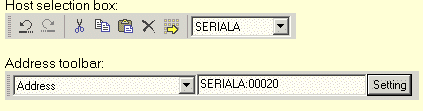
If you want to fill in an address for an object you can use the address field in the toolbar.
This feature is currently not supported for PTMEM memory.
This address field shows you first the host name and then the address as follows:
ex: SERIALA:00020
This feature is currently not supported for PTMEM memory.
Was this article helpful?
That’s Great!
Thank you for your feedback
Sorry! We couldn't be helpful
Thank you for your feedback
Feedback sent
We appreciate your effort and will try to fix the article