For connection to the PLC: click on the PLC menu and then Work Online.
There is an Icon present in the Toolbar.
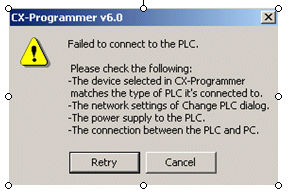
If the communications settings are correct, and the hardware connection is correct, then the connection should be established. If the settings are wrong or the cable connection is not correct, then you get the following error message:
There is an Icon present in the Toolbar.
If the communications settings are correct, and the hardware connection is correct, then the connection should be established. If the settings are wrong or the cable connection is not correct, then you get the following error message:
Another way is the Auto Online method.
Click on PLC and then onto Auto Online.
The existing project is completed and a new project starts.
If the connection is established, you are asked whether the program in the PLC should be uploaded.
Was this article helpful?
That’s Great!
Thank you for your feedback
Sorry! We couldn't be helpful
Thank you for your feedback
Feedback sent
We appreciate your effort and will try to fix the article