The C1000H, C2000H, C200, C200Halpha, C200HS, CJ1, CS1, CPM1, CPM2, CQM1, CQM1H, CV1000, CV2000, CV500,
CVM1 & SRM1 can all be programmed. with CX-Programmer.
After selecting the PLC series in CX-Programmer make sure the right CPU type is selected.
Select the PLC icon in the workspace (the default tree that is left of the screen).
Double-click on this icon, enter or operate as it has been selected.
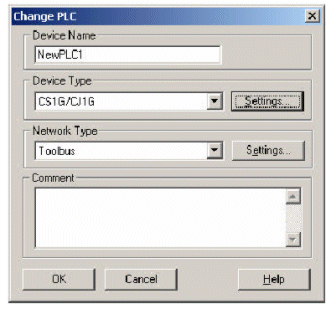
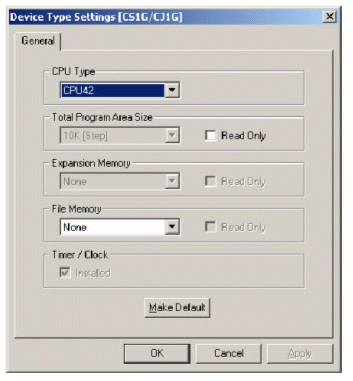
The PLC can be adjusted by Device Type. By pressing the Settings button next to the selected PLC and then clicking in the following dialogue box you can change the CPU type selected.
You may not be able to connect to the PLC if the PLC CPU type and model is not well established. In this instance CX-Programmer displays an error message saying that the PLC xxx instead of xxx is selected.
CVM1 & SRM1 can all be programmed. with CX-Programmer.
After selecting the PLC series in CX-Programmer make sure the right CPU type is selected.
Select the PLC icon in the workspace (the default tree that is left of the screen).
Double-click on this icon, enter or operate as it has been selected.
The PLC can be adjusted by Device Type. By pressing the Settings button next to the selected PLC and then clicking in the following dialogue box you can change the CPU type selected.
You may not be able to connect to the PLC if the PLC CPU type and model is not well established. In this instance CX-Programmer displays an error message saying that the PLC xxx instead of xxx is selected.
Was this article helpful?
That’s Great!
Thank you for your feedback
Sorry! We couldn't be helpful
Thank you for your feedback
Feedback sent
We appreciate your effort and will try to fix the article