CX-Supervisor Developer and Runtime may give the following error if run on a machine by a user with limited permissions:
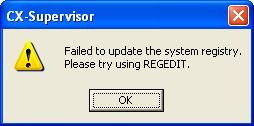
You can give a non-admin user ability to use CX-Supervisor by granting them permission to access parts of registry which CX-Supervisor requires.
To do this you must do the following:
- Login as the user who needs to run CX-Supervisor.
- Start regedit as an admin user (create a shortcut and change shortcut to run as another user you will need to know the Admin password here)
- Go to HKEY Classes Root
- Give the user permission to access:
CX-Supervisor.Project
CX-Supervisor.Application
Permission is given by right clicking on the registry key, selecting permissions and clicking the 'add' button
- Check the box to give full access for this user
- Go to CLSID
- Give the user permission to access:
- {0002D781-0000-0000-C000-000000000046}
- {0002DF01-0000-0000-C000-000000000046}
- Check the box to give 'Full Control' for this user
Was this article helpful?
That’s Great!
Thank you for your feedback
Sorry! We couldn't be helpful
Thank you for your feedback
Feedback sent
We appreciate your effort and will try to fix the article